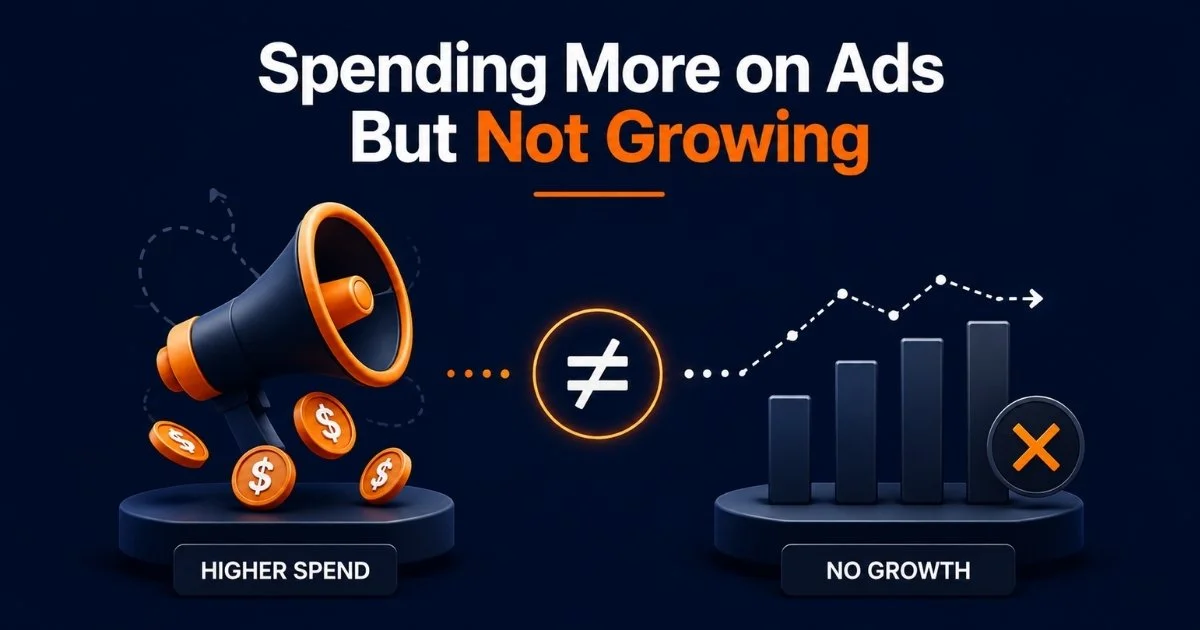
Why You’re Spending More on Ads But Not Growing
Most Amazon sellers hit this wall at some point. Ad spend keeps climbing, budgets go up, bids get adjusted, new campaigns get launched, and revenue just sits there. Flat. Sometimes it moves a little, but nothing close to what the spending increase should be producing.
If you’re spending more on ads but not growing, the problem is rarely just the budget. It’s what’s happening underneath weak listing conversion, campaigns competing against each other, traffic that was never going to buy, and a paid strategy running without a solid organic foundation beneath it.
This blog breaks down exactly why this happens and what to actually do about it. For many sellers, this is the core frustration behind Amazon PPC not growing sales — the budget keeps increasing, but the results don’t follow.
The core reason sellers end up spending more on ads but not growing is a mix of rising CPC, low CVR, campaign overlap, wasted search terms, and paid sales replacing organic sales. The fix is not to blindly cut spending or raise budgets. It is to audit the full PPC system keyword control, listing quality, search term data, TACoS, and organic rank before scaling anything.
Not sure where your spend is going? We’ll show you.
Table of Contents
More Spend Does Not Mean More Growth
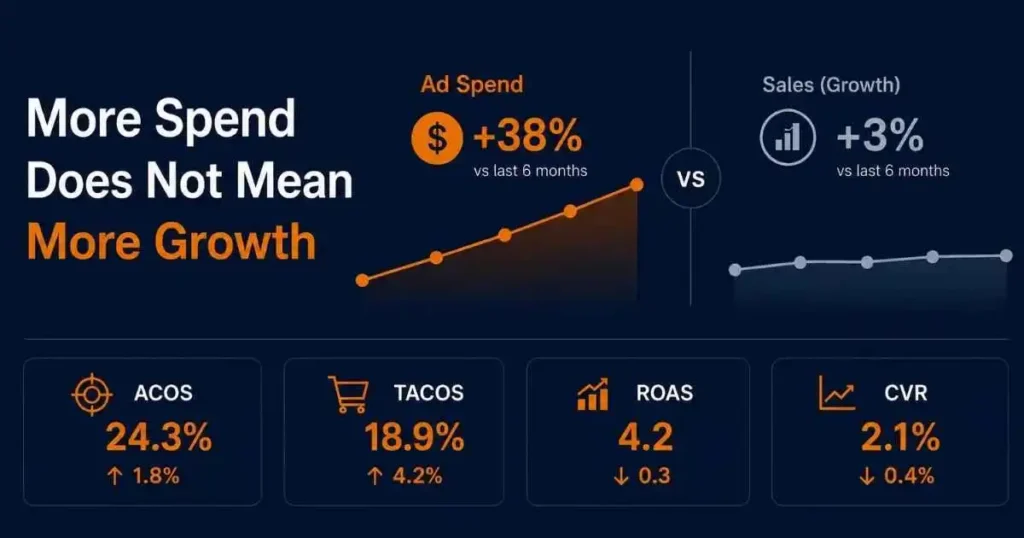
Amazon makes it easy to think that more budget equals more results. This is exactly what increasing Amazon ad spend without a system looks like — money going out, revenue staying flat. In reality, that relationship only holds when the fundamentals are already working. When they’re not, more spending just amplifies the problem.
Why Ad Sales Hide Flat Growth
The dashboard can look fine while the business is stuck. Ad sales go up. ROAS holds. ACoS stays under the target. But total revenue organic plus paid combined doesn’t move. What’s actually happening is that paid sales are masking flat or declining organic performance. The ads aren’t growing the business. They’re keeping it from shrinking.
This is one of the most common traps in Amazon PPC, and it’s almost invisible until you look at the full revenue picture rather than just ad-level metrics.
ACoS Looks Fine, But TACoS Is Rising
ACoS only measures how your ads are performing relative to the sales they directly generate. TACoS measures what percentage of your total revenue is being driven by paid spend. If ACoS holds steady while TACoS climbs, your ads are eating a bigger and bigger slice of total sales — not because they got less efficient, but because organic is shrinking underneath them.
A rising TACoS is one of the clearest signs that increasing Amazon ad spend is not translating into real business growth. The ad account looks healthy. The business isn’t.
Paid Sales Replacing Organic Sales
When a product is in a healthy state, ads and organic work together. Ads drive sales velocity, velocity lifts organic rank, and organic rank generates free traffic that compounds over time. That’s the cycle that produces real growth.
When the cycle breaks because of listing issues, keyword misalignment, or inconsistent sales velocity, ads stop adding to organic. They start replacing it. Every sale comes from a sponsored placement. Switch off the ads and revenue drops immediately. That’s not a scaling problem. It’s a structural one.
Your Listing Is Killing Conversions
Many sellers jump straight to the ad account when growth stalls. They change bids, restructure campaigns, and test new targeting. But if the listing can’t convert the traffic it’s already getting, none of that matters.
CVR Drop Is the Real Budget Killer
The Conversion rate is the metric that connects your ad spend to your actual revenue. When CVR drops, ACoS goes up automatically, not because targeting got worse, but because fewer of the people clicking your ad are buying. You’re paying the same or more per click, just getting less out of each one.
This is where a large portion of the wasted budget hides. Not in bad targeting. In a listing that looks fine on the outside but isn’t giving shoppers a strong enough reason to buy.
How to Spot a Conversion Problem
Look at CTR and CVR side by side. If CTR is healthy, people are clicking the ad, but CVR is low, the listing is the bottleneck, not the campaign. Shoppers are arriving and leaving without buying.
The first things to check are your main image, price point relative to competitors, review count, and the clarity of your bullet points. A product with fewer than 15 reviews, a hero image that doesn’t immediately communicate value, or pricing that’s off by even a small margin will consistently underperform regardless of how well-structured the campaign is. Most sellers who feel their Amazon ads are not working are actually dealing with a listing problem, not a targeting problem.
More Traffic Cannot Fix a Weak Offer
This one is straight forward but gets ignored constantly. If the product has a fundamental conversion problem, weak social proof, unclear positioning, or an uncompetitive price, sending more traffic through ads makes things worse, not better. Spending goes up. CVR stays low. ACoS climbs. And sellers keep adjusting bids, wondering why nothing is working.
Fix the listing first. Make sure it can actually convert. Then worry about scaling traffic.
Keyword Cannibalization Is Inflating CPC
Most sellers know their competitors drive CPC up. What most don’t realize is that their own campaigns can do the same thing.
When Campaigns Compete Against Each Other
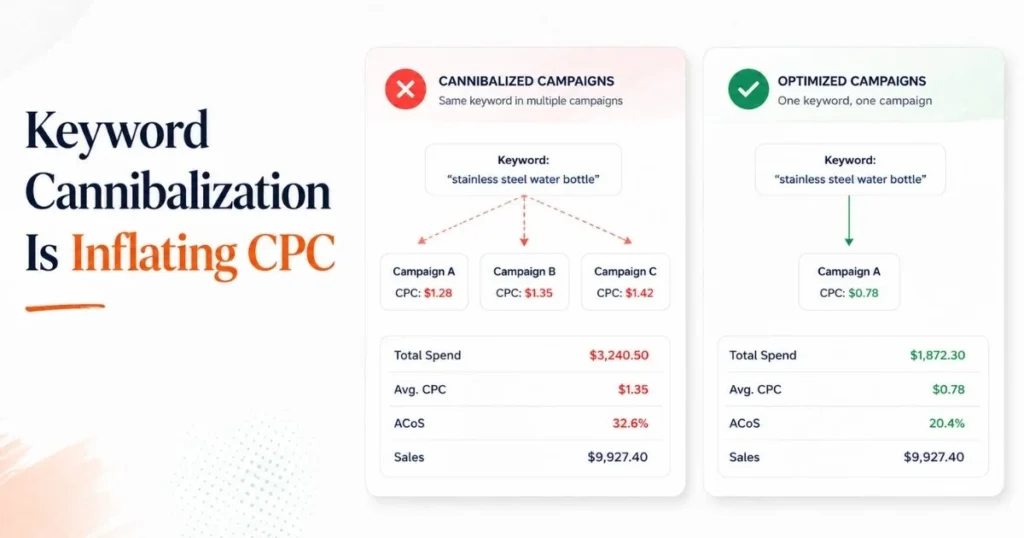
Keyword cannibalization happens when multiple campaigns in the same account bid on the same search terms. Auto campaigns and manual campaigns running simultaneously without proper negative keyword lists are the most common culprit. Multiple campaigns targeting the same search term can split data, duplicate spend, and make CPC control harder because the same keyword is being managed from different places instead of one clean source of truth.
The result is artificially high CPC, a split budget that should be concentrated, and messy performance data because the same keyword is reporting across two or three different campaigns at once.
How Overlap Wastes Budget
Campaign overlap doesn’t always look like a problem from inside the account. Both campaigns show impressions, clicks, and sales. Individually, they might hit their ACoS targets. But the combined CPC across both is higher than it would be with clean keyword ownership, and the total attributed sales don’t justify what both campaigns are spending.
This is one of the clearest patterns behind Amazon ads not working the way sellers expect. Spending goes up, performance looks reasonable on paper, but real growth doesn’t show up. Campaign overlap is one of the most common reasons accounts end up with Amazon PPC not profitable, even when they look structured on the surface.
Separate Keywords by Intent
The fix is to assign every keyword a home and ensure it lives in one campaign. High-intent, proven converting terms go into manual exact campaigns with focused budgets. Broader discovery terms go into auto or research campaigns with negative keyword lists that prevent those terms from triggering the exact campaigns, too.
When keyword ownership is clean, CPC stabilizes, data becomes readable, and budget stops getting split across competing placements.
You're Bidding on Traffic, Not Buyers
When budget flows toward the wrong searches, the result is predictable — Amazon PPC stops being profitable, not because ads are broken, but because the traffic never had buying intent. Clicks are not sales. This sounds obvious, but the way most Amazon PPC accounts are structured, a significant portion of the budget goes toward traffic that was never going to convert.
Auto Campaigns Burning Budget
Auto campaigns are valuable for discovery — they surface search terms you wouldn’t have thought to target manually. But left without guardrails, they pull in everything: loosely related searches, competitor brand names, terms from completely different categories. Amazon’s algorithm is optimizing for relevance to your listing, not for buyer intent.
If your auto campaigns are running with no negative keyword management and no regular search term review, you’re almost certainly paying for a large volume of clicks that have no real chance of converting.
Irrelevant Clicks Draining Your Spend
Every irrelevant click has two costs. The direct CPC you pay for it. And the CVR signal it sends to Amazon, low conversion on a search term tells the algorithm your product isn’t relevant for that query, which can hurt both your paid and organic performance on that term over time. You’re paying money to send a negative relevance signal.
The only way to stop this is to actually look at the Search Term Report, identify what’s spending without converting, and add those terms as negatives before they do more damage.
How Negative Keywords Protect Your Budget
Every term you negate redirects budget away from a non-converting click toward a search that has real potential. Done consistently, this one habit alone shifts the quality of your traffic, lowers CPC on average, improves CVR, and provides data to make actual decisions.
Weak Organic Rank Makes Ads Expensive
There’s a version of Amazon PPC that works the way it’s supposed to: ads drive sales, sales build rank, rank generates organic traffic, and organic traffic reduces your dependence on paid spend over time. Most sellers never get there because organic rank is an afterthought.
Why Ads Cannot Fix Poor Indexing
If your product isn’t indexed for a keyword, Amazon won’t show it organically for that search. Every sale on that term has to come through a paid placement. You’re renting visibility that a well-optimized listing would earn for free.
Ads can drive traffic and sales to a product that’s not indexed, but they can’t fix the indexing problem. Organic rank comes from relevance, how well the listing is optimized for a keyword, and from consistent sales velocity on that term. Ads support both of those signals, but only if the listing is set up correctly from the start.
The Organic-Paid Balance Sellers Miss
The goal of Amazon advertising is not to run ads forever at full spend. It’s to use paid traffic to build the sales velocity and keyword relevance that earns organic rank, and then let organic do more of the work so that CPC costs as a percentage of total revenue start to drop.
When organic rank stays weak, and every sale comes through sponsored placements, the business never gets that compounding effect. Ad spend stays high. Organic stays flat. And total revenue stays stuck at whatever the ad budget can sustain.
When PPC Fails to Build Rank
If campaigns have been running for several months and organic rank hasn’t moved, that’s a signal that something structural is wrong. Either the listing isn’t converting well enough for Amazon to recognize keyword relevance, the keywords being targeted in campaigns don’t match the terms the listing is indexed for, or the sales velocity from ads isn’t consistent enough to push the rank up.
This is not a bidding problem. No bid adjustment will fix organic rank. The fix is to align PPC keyword targets with indexed terms and make sure the listing can convert the traffic being sent to it.
Attribution Is Distorting Your Data
Good decisions come from good data. And in Amazon PPC, the default reporting setup makes it easy to think your ads are performing better than they actually are.
Why ROAS Looks Better Than Reality
Amazon’s default attribution window is 7 days — meaning a sale gets credited to an ad if the shopper clicked it within the last week before purchasing. That means attributed sales can make ROAS look stronger than the true growth behind the business.
The problem is that some of those customers would have purchased anyway organically through search or through a repeat purchase habit. The ad didn’t create that sale. It just happened to be in the attribution window.
In categories with high purchase intent or repeat buyers, this can mean a meaningful portion of your attributed ad sales aren’t truly incremental. Your ROAS looks strong. But the actual additional revenue your ads are generating is lower than what the dashboard shows.
Why Sales Still Are Not Growing
This is the gap behind most cases where Amazon ads are not working, which is the complaint, but the ad account itself looks fine. Ad metrics look fine. ACoS and ROAS are hitting targets. But total revenue doesn’t move. When you dig into it, a large chunk of attributed sales is from buyers who would have converted without the ad. The real incremental impact of the spend is significantly smaller than what’s being reported.
When that’s the case, increasing ad spend doesn’t produce proportional revenue growth, because most of the growth you’re “buying” was going to happen anyway.
Making Bid Decisions With Better Data
The fix is to stop using ACoS and ROAS as the only performance signals. Look at total sales trends, organic plus paid, over weeks and months. Track new-to-brand sales where available. Monitor how TACoS changes in response to spend increases. Watch organic rank movement as a proxy for whether ads are building real momentum.
When bids are adjusted based on the full picture instead of just ad-level metrics, the decisions get better, and the spend starts producing actual growth instead of just bigger attributed numbers.
Metrics That Reveal the Real Problem
Before changing anything, know exactly what you’re dealing with. This table gives you a quick way to match what you’re seeing in the account to what’s actually causing it. If increasing Amazon ad spend is not moving your total revenue, this table tells you where to look first.
| Metric Pattern | What It Means | What to Fix |
|---|---|---|
| Spend up, sales flat | Budget is not creating growth | Full campaign audit |
| CPC up, CVR down | Listing is not converting | Fix listing first |
| ACoS fine, TACoS rising | Total growth is weak | Improve organic rank |
| CTR high, CVR low | Clicks but no buyers | Improve the offer |
| Spend up, TACoS down | Healthy scaling | Scale carefully |
| Spend up, TACoS up | Inefficient growth | Cut non-converting spend |
Imagine a seller increases monthly Amazon ad spend from $3,000 to $5,000. Ad sales rise slightly, but total revenue stays almost flat. At first, the campaigns look acceptable because ACoS is still within the target. But after reviewing TACoS, Search Term Reports, and CVR, the real issue becomes clear: multiple campaigns are targeting the same terms, auto campaigns are wasting spend on weak searches, and the listing is converting below category expectations.
After cleaning campaign overlap, adding negatives, moving proven terms into exact match, and improving the main image and offer, spend becomes more efficient. The goal is not simply to spend less. The goal is to make every dollar create either profitable sales, better organic rank, or cleaner data.
How to Stop Overspending and Grow
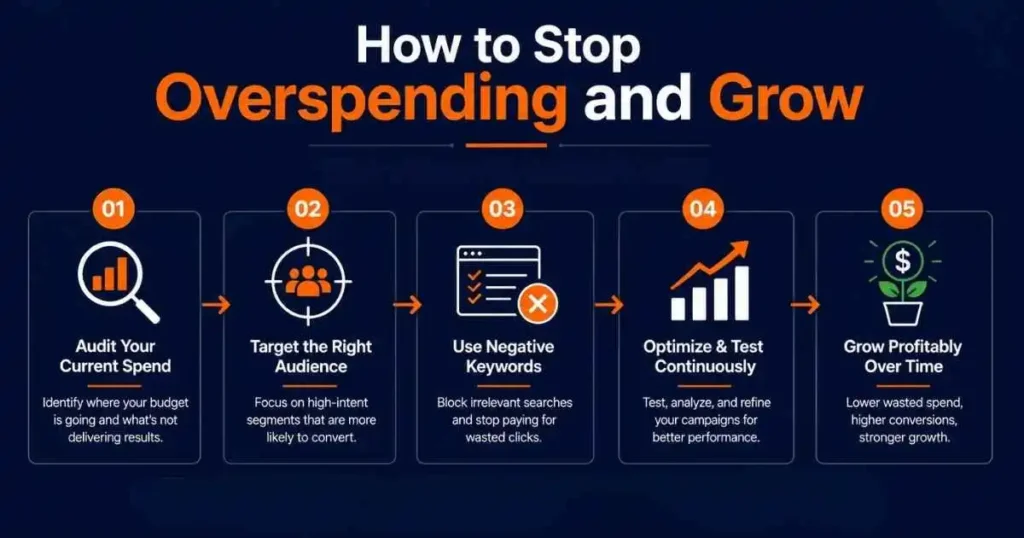
If you’re spending more on ads but not growing, the answer is to fix the system, not just adjust a few bids and hope the numbers change.
Audit Campaigns by Purpose
Start by giving every campaign a defined job. Discovery campaigns find new converting search terms. Ranking campaigns concentrate the budget on core keywords to build sales velocity. Profit campaigns scale what’s already proven. If campaigns don’t have clear, separate purposes with proper keyword ownership between them, you’re running the account blind. Most Amazon PPC not profitable situations trace back to exactly this.
Separate Winners From Budget Drainers
Pull your Search Term Report sorted by spend. Every term that has accumulated a high cost with no attributed sales gets negated immediately. Every term that converts consistently at a good ACoS gets moved into a dedicated exact match campaign with its own budget. This is how you stop burning money and start concentrating it.
Fix Listing Before Scaling
Before increasing any budget, verify that the listing can handle the traffic. Check your main image, A+ Content, pricing, and reviews. A CVR improvement of even 1–2% has a larger impact on profitability than most bid optimizations. Fix the conversion first. Scale traffic second.
Mine Search Terms Weekly
The Search Term Report is the most useful data source in the whole account. Weekly review catches non-converting spend before it becomes a problem, surfaces new terms worth promoting, and keeps negative keyword lists current. Sellers who do this consistently run cleaner, more efficient accounts than those who check once a month.
Scale Only When TACoS Improves
The right signal to increase the budget is a declining TACoS, which means ads are building organic momentum, and that additional spend will generate real growth. If TACoS is flat or rising, the scaling budget will only deepen the inefficiency. Wait for the signal, then scale Amazon ads without hurting profit margins.
How ScaleA2Z Fixes Spend Inefficiency
- Profit-First Campaign Audit: Every ScaleA2Z engagement starts with a full audit of the existing campaign structure. We identify where the budget is going, which campaigns are generating real growth versus just attributed ad sales, and where the biggest inefficiencies are sitting. That gives us a clear baseline before anything gets changed.
- Search Term Cleanup: Our team reviews Search Term Reports regularly, negating irrelevant spend, promoting converting terms into the right campaigns, and keeping keyword ownership clean across the account. This kind of consistent search term management is what separates accounts that get more efficient over time from those that stay stuck.
- Listing and PPC Alignment: We don’t manage ads in isolation. If a listing has CVR problems, we flag them before scaling traffic. Running ads to a listing that can’t convert is one of the most reliable ways to burn budget with no return. PPC performance and listing quality have to move together.
- Controlled Scaling Strategy: Once campaigns are clean and the listing is converting, ScaleA2Z uses data-driven bid adjustments to scale spend in a controlled, deliberate way, increasing budget where it’s proven to drive both attributed sales and organic rank improvement, not across the board just to hit a spend target. To see how ScaleA2Z manages Amazon PPC with campaign audits, search term cleanup, listing alignment, and controlled scaling, explore our Amazon ads management service.
Conclusion
Ad spend going up without growth to match is one of the more frustrating places to be as an Amazon seller — because the problem isn’t visible in any single metric. ACoS can look fine. ROAS can hit targets. And revenue still won’t move.
The real issue is almost always layered. Campaigns overlap and inflate CPC. A listing that converts poorly. Paid sales replacing organic ones. Attribution numbers that look better than the business underneath them.
If you are spending more on ads but not growing, the fix starts with stepping back from the bids and looking at the whole system. Audit your campaigns for keyword overlap. Check whether your CVR can justify more traffic. Review your Search Term Report for spend that’s going nowhere. And make sure organic rank is actually responding to your paid activity before you increase a single budget.
When those foundations are solid, scaling ad spend produces real, compounding growth. When they’re not, more budget just makes the same problems more expensive.
ScaleA2Z helps Amazon sellers fix exactly this — from campaign structure and search term control to listing alignment and bid management built around profitability. If your spend keeps climbing without the results to match, let’s talk.
Spend keeps climbing, results don’t follow — this is where to start.
Frequently Asked Questions
Why am I spending more on ads but not growing?
Usually, it comes down to a combination of three things: campaigns overlapping and pushing CPC up, a listing that isn’t converting the traffic it receives, and paid sales replacing organic sales instead of adding to them. Fixing it requires looking at the full picture, not just the ad account.
Why are Amazon ads not increasing sales?
Ads bring traffic. They don’t guarantee sales. If your listing has weak images, thin reviews, or pricing that’s off relative to competitors, the traffic won’t convert. Before changing any campaign settings, check whether the listing itself is giving visitors a real reason to buy.
What causes high CPC on Amazon?
The two most common causes are increased competition from other sellers and keyword cannibalization within your own account. When your own campaigns bid against each other on the same terms, CPC goes up without any additional competition from outside. Cleaning up campaign overlap is usually the fastest way to bring CPC down.
Is high ACoS always bad?
No. During a launch or ranking push, a high ACoS is expected and acceptable — you’re investing in sales velocity, not immediate profit. The concern is when ACoS is high on an established product because the listing isn’t converting, not because you’re deliberately investing in rank.
Why is my TACoS increasing?
Rising TACoS means your total revenue is becoming more dependent on paid ads. Organic sales are either flat or declining, and paid sales are filling the gap. The fix is to improve listing relevance, build organic rank through consistent sales velocity, and reduce reliance on ads for every single sale.