How to Build an Amazon PPC Campaign Naming Convention That Scales
You open your Amazon Ads console to check why spend jumped overnight, and you’re staring at 60 campaigns named “Campaign 1,” “Campaign 1 – Copy,” and “New Campaign (3).” One of them may be driving the spike, but from the names alone, you can’t tell which one.
This usually becomes a problem as campaign volume grows and different products, targeting types, and ad formats start piling into the same account. Nobody plans to end up here. It happens one quick launch at a time, until the account is unmanageable without opening every single campaign to figure out what it does.
A documented naming convention prevents much of this confusion, provided everyone managing the account follows the same system. It’s not a cosmetic habit. A clear naming system helps you identify the right campaign faster without opening multiple campaigns just to understand what each one does.
At ScaleA2Z, this is one of the areas we review when taking over an account, alongside fixing the underlying campaign structure. In this guide, you’ll get a naming framework you can apply today, whether you’re setting up a brand-new account or untangling one that’s already a mess.
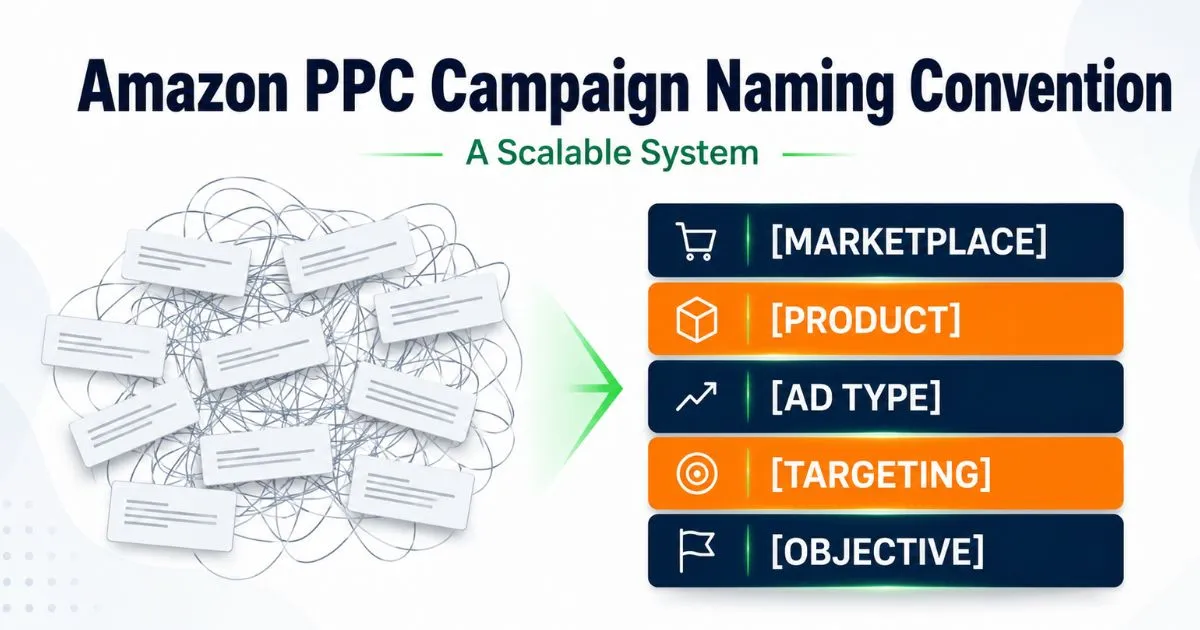
A scalable Amazon PPC campaign naming convention uses the same field order across every campaign. A practical format is Marketplace + Product + Ad Type + Targeting + Objective, with an optional version tag. Keep stable identifiers in the name and leave changing metrics such as bids, budgets, ACoS, and ROAS out.
Table of Contents
Why Campaign Naming Breaks Down as Amazon Accounts Grow
Nobody starts with a bad naming system on purpose. It usually starts fine, then falls apart under pressure.
You launch a product with two or three campaigns and name them something reasonable. Then you add auto and manual variants. Then Sponsored Brands. Then a product-targeting campaign against a competitor ASIN. Six months later, you have 40 campaigns and no memory of which naming logic you used for the first ten versus the last ten.
A few signs your account has already hit this wall:
- You search for a campaign by product name and get five results with no way to tell them apart.
- Two team members create campaigns with different naming logic in the same week.
- You avoid bulk edits because you’re not confident you’re selecting the right campaigns.
- Reporting takes longer than it should because you’re manually cross-checking campaign names against a spreadsheet.
- A new hire or agency taking over the account has to ask you what half the campaigns mean.
None of these are catastrophic on their own. Together, they slow down account management and make it harder to identify where spend, targeting, or campaign structure needs attention.
What a Good Amazon Campaign Naming Convention Actually Needs to Do
Before building the framework, it helps to be clear on what it’s actually solving for. A naming convention isn’t just about looking organized. It’s a functional system with three main jobs.
Searchability first
You should be able to search Campaign Manager and quickly pull every campaign tied to a specific product, ad type, or targeting method. If your names don’t support that, the convention has already failed at its main job.
Consistency Across Team Members and Tools
If you manage the account alone, consistency is a habit. If you work with a team, a freelancer, or an agency, it has to be a documented rule everyone follows the same way. Otherwise, campaign 41 gets named completely differently from campaign 12, and the system quietly breaks.
Room to scale without a rebuild
A naming convention that only works for 20 campaigns isn’t a convention, it’s a placeholder. Build it so it still makes sense at 200 campaigns across multiple marketplaces without requiring a full renaming project every year.
Quick Tip: Before you rename anything, write your naming rule down in one sentence, like a legend. If you can’t explain your own system in one sentence, it’s too complicated for anyone else on your team to follow consistently.
The Scalable Amazon PPC Campaign Naming Framework
A scalable naming system should use the same field order across the account. A practical format is:
[Marketplace]_[Product]_[Ad Type]_[Targeting]_[Objective]_[Optional Version]
For example:
US_ProteinPwr_SP_Exact_Profit_V2
The first five fields describe the campaign’s stable identity and purpose. Use a version or date only when it identifies a meaningful launch, test, or major structural rebuild.
Part 1 – Marketplace
Use a short marketplace code when you manage the same products across multiple Amazon marketplaces.
- Examples: US, UK, CA
- Example: US
Part 2 — Product Identifier
Start with a short product name and, where useful, the ASIN. This is what lets you filter every campaign tied to one SKU in seconds.
Example: US_ProteinPwr
Part 3 – Ad Type
Identify the Amazon ad type using one consistent abbreviation across the account. Common abbreviations include SP (Sponsored Products), SB (Sponsored Brands), and SD (Sponsored Display).
Example: US_ProteinPwr_SP
Part 4 – Targeting Method
Add the targeting method or match type that best identifies how the campaign reaches shoppers.
Examples include Auto, Exact, Phrase, Broad, and PT (Product Targeting).
Example: US_ProteinPwr_SP_Exact
Part 5 – Objective
Add a short objective tag that explains why the campaign exists. Keep the wording consistent across similar campaigns.
- Examples: Profit, Discovery, Ranking, BrandDef, or Conquest
- Example: US_ProteinPwr_SP_Exact_Profit
Date or Version Marker
Use a date or version only when it helps identify a meaningful launch, test, or major campaign rebuild. Avoid changing the campaign name every time you adjust bids, budgets, or targeting settings.
Example: US_ProteinPwr_SP_Exact_Profit_V2
Here’s what the framework looks like in a representative before-and-after example:
| Before | After |
|---|---|
| Campaign 1 | US_ProteinPwr_SP_Auto_Discovery |
| New Campaign (2) | US_ProteinPwr_SP_Exact_Ranking |
| protein powder ppc | US_ProteinPwr_SB_BrandDef_Awareness |
| test campaign final | US_Collagen_SD_Remarketing_V2 |
Notice that each renamed campaign tells you the product, the ad type, the targeting method, and the goal, all without opening it. That’s the entire point of the system.
Naming Portfolios and Ad Groups So They Inherit From Campaigns
A naming convention that only covers campaigns is half a system. If your portfolios and ad groups don’t follow the same logic, you’re back to hunting through the account manually within a few months.
Portfolio-level naming logic
A practical approach is to keep portfolio names broader than individual campaign names, such as by brand, product family, category, or another useful business grouping. Think of a portfolio name as the folder and the campaign name as the file inside it.
Example: Brand_ProteinPwr as the portfolio, with US_ProteinPwr_SP_Exact_Ranking_V2 and every related campaign living inside it.
This matters more once you’re running a scalable Amazon PPC architecture across several product lines. Without portfolio-level grouping, budget caps and reporting have to be pieced together campaign by campaign instead of read at a glance.
Ad group naming shortcuts
Ad groups don’t need a fully separate naming system. The simplest approach is to inherit the campaign name and add one identifier for what’s inside the ad group.
For tightly segmented ad groups, add a short keyword or theme identifier rather than repeating unnecessary campaign information. For example, ProteinPwr_Exact_WheyIsolate quickly shows what the ad group contains.
Quick Tip: Don’t reinvent the naming logic at the ad group level. If your campaign naming convention uses underscores and abbreviations, keep that exact pattern in ad groups too. A mixed format between campaigns and ad groups defeats the purpose of a searchable system.
If your account structure itself still feels reactive rather than planned, this naming layer works best on top of a properly structured PPC account, not as a substitute for one. Naming organizes what you have. Structure determines whether what you have is set up to convert profitably in the first place. That’s usually where we start when managing a client’s PPC, before touching naming conventions at all.
Auto vs Manual Campaign Naming Convention
One of the most common naming gaps we see in Amazon accounts is auto and manual campaigns that look identical at a glance. This causes real problems, because auto and manual campaigns serve different jobs and need to be told apart instantly, especially when you’re pulling search term reports to harvest keywords from auto into manual.
Your naming convention should make the auto vs. manual distinction non-negotiable:
- Auto campaign: US_ProteinPwr_SP_Auto_Discovery
- Manual, exact match: US_ProteinPwr_SP_Exact_Ranking
- Manual, broad match (research phase): US_ProteinPwr_SP_Broad_Research
This distinction becomes even more useful for Amazon bulk operations campaign naming, since you can filter your bulk sheet by “Auto” or “Broad_Research” and instantly isolate every campaign in the discovery phase across your entire catalog, without opening a single one individually.
Sponsored Brands and Sponsored Display Naming Format
Most naming guides stop at Sponsored Products. But once your account includes Sponsored Brands and Sponsored Display, the naming convention needs to flex to cover creative type and funnel stage, not just keyword targeting.
For Sponsored Brands, the name may also identify the ad format or destination when that detail helps distinguish campaigns. Amazon currently supports Sponsored Brands formats such as Collections, Store Spotlight, and video. Amazon’s official Sponsored Brands collections guide explains how automatic and manual collections work. Within Collections, advertisers can use automatic or manual product selection.
- US_ProteinPwr_SB_ManualCollection_Awareness
- US_Brand_SB_StoreSpotlight_Awareness
For Sponsored Display, make the targeting tactic clear when it helps distinguish campaigns. Depending on the campaign setup, this may include remarketing based on views or purchases, or contextual targeting. Amazon currently distinguishes remarketing and contextual targeting within Sponsored Display workflows.
- US_ProteinPwr_SD_Remarketing_Views
- US_ProteinPwr_SD_Contextual_Competitor
Quick Tip: If you manage campaigns across SP, SB, and SD for the same product, keep the product identifier (Part 2 of the framework) identical across all three ad types. That’s what lets you search one product name and pull every campaign touching it, regardless of ad type.
What Should You Leave Out of an Amazon Campaign Name?
A scalable naming convention should describe stable campaign identity and purpose, not every setting or performance metric inside the campaign. Adding frequently changing information creates unnecessary renaming work and makes historical campaign names harder to interpret.
Current ACoS or ROAS
These metrics change as performance changes. Keep them in reports and dashboards rather than campaign names.
Daily Budget or Current Bid
Budgets and bids are operating settings, not stable identifiers. They may change frequently as campaigns are optimized.
Employee or Manager Names
Account ownership can change. The campaign name should still make sense when another person takes over.
New, Final, Latest, or Test 2
These labels quickly lose meaning as you create more campaigns.
Last-Edited Dates
Don’t rename a campaign every time you make an optimization.
Quick Tip: Use campaign names for stable identity and purpose. Use reports for changing performance data.
Amazon's Character Limits and Naming Rules You Can't Ignore
Before you commit to a naming format, check it against Amazon’s actual technical limits. Building a naming convention that looks great on paper but breaks in bulk sheets defeats the purpose. Check the latest requirements in Amazon’s Ads API documentation before finalizing a naming system.
| Rule | Verified Detail |
|---|---|
| Seller campaign-name maximum | 128 characters |
| Vendor campaign-name maximum | 116 characters |
| Ad-group-name maximum | 255 characters |
| Bulk campaign-name updates | Supported using the existing campaign ID |
Use one delimiter consistently across the account. Underscores work well because they make each field visually distinct and are easy to use in spreadsheet-based workflows. Whatever separator you choose, document it and keep it consistent across campaign names.
Keep separators and abbreviations consistent across the account, and validate your file against Amazon’s bulksheet requirements before uploading.
These limits leave enough room for a practical multi-field campaign name, but it is still worth keeping each field concise so the system remains easy to scan and manage.
Auditing and Fixing an Already-Messy Campaign List
If you’re reading this because your account is already chaotic, you don’t need to start from zero. You need a structured cleanup pass.
- Export your current campaign list using Amazon’s bulk sheet download rather than working inside the console one campaign at a time.
- Tag each campaign by product, ad type, and targeting method in helper columns before touching the actual name field. This is your mapping layer.
- Flag duplicates and dead campaigns you find during the export. A naming cleanup is also the easiest time to catch campaigns that should be paused or merged.
- Apply your new naming format in a formula column, combining your helper columns into the final name using a simple text-join formula.
- Upload the updated bulk sheet rather than manually renaming each campaign in the interface. On accounts with 50+ campaigns, this step alone saves hours. If you’re new to spreadsheet-based campaign changes, see our Amazon PPC bulk campaign tool guide before attempting a large account cleanup.
- Document the convention in a one-page reference your team or agency can follow going forward, so the account doesn’t drift back into chaos in six months.
Quick Tip: For growing accounts, a quarterly naming check is a practical way to catch naming drift, with an extra review after major launches or restructures. New product launches and seasonal campaigns are the most common source of naming drift, even in accounts that started clean.
Naming Conventions for Agencies Managing Multiple Brands
If your reporting or operational workflow combines data from several brands or advertiser accounts, adding a short brand or client code can reduce ambiguity. This is especially useful when different brands sell similar products or use similar campaign structures. If each advertiser account is already clearly separated, you may not need this extra field.
Extend the framework by adding a brand or client code as the first field:
- [Brand/Client]_[Marketplace]_[Product]_[Ad Type]_[Targeting]_[Objective]_[Optional Version]
- Example: SA2Z_US_ProteinPwr_SP_Exact_Ranking_V2
The product identifier can be a short product code, an ASIN, or a SKU, depending on the account. Since the marketplace is already built into the core framework, this addition is the only extra field most agencies need.
This is one of the first things we standardize when we take over account management for a new brand, particularly when managing multiple brands under one team. A consistent naming convention across every client account means any strategist on the team can open an unfamiliar account and understand the campaign map much faster without having to open campaigns individually.
If your account has grown past the point where you can manage this cleanup yourself, or you just want a second set of eyes on your current structure, you can book a free account audit with our team. We’ll show you where unclear naming, campaign structure, and management workflows are making your account harder to control and optimize.
The 5-Minute Campaign Naming Quality Test
Before rolling a naming convention across the account, test whether another person could understand and filter your campaigns without opening each one.
| Test | Question |
|---|---|
| Product | Can you immediately identify what's being advertised? |
| Ad type | Is SP, SB, or SD clear? |
| Targeting | Can you identify Auto, Exact, Broad, PT, or another tactic? |
| Purpose | Can you tell why the campaign exists? |
| Searchability | Can related campaigns be filtered together? |
| Stability | Will the name still make sense after bids and budgets change? |
If the naming system fails several of these checks, simplify it before applying it across more campaigns.
The Bottom Line
A good Amazon PPC campaign naming convention doesn’t make your ads perform better on its own. What it does is remove friction between you and the decisions that actually improve performance, because you can find the right campaign, understand what it’s doing, and act in seconds instead of minutes.
Whether you’re building from scratch or fixing an existing account, the core framework stays the same: marketplace, product identifier, ad type, targeting method, and objective. Add a version or date only when it identifies a meaningful launch, test, or major rebuild. Keep portfolio and ad-group naming consistent with the same logic, and review the system after major launches, restructures, or account growth.
If you’d rather have this handled for you, from naming conventions to full PPC management and account strategy, our team at ScaleA2Z builds this structure into every account we manage from day one. Get in touch for a free audit, and we’ll show you exactly what your account’s naming and structure should look like.
Frequently Asked Questions
What is the best Amazon PPC campaign naming convention?
A scalable Amazon PPC campaign naming convention typically identifies the marketplace, product, ad type, targeting method, and campaign objective in the same order. A version or date can be added when it identifies a meaningful launch, test, or major rebuild. The exact abbreviations matter less than using them consistently across the account.
Can I Rename an Existing Amazon Ads Campaign?
Amazon supports updating existing campaign names, including through bulk sheets. For a bulk update, use the existing Campaign ID and enter the new campaign name so Amazon updates the intended campaign rather than creating a different campaign entry.
Should I Use an ASIN, SKU, or Product Code in Amazon Campaign Names?
Use the identifier your team can recognize and filter consistently. An ASIN can work well when a campaign is tied closely to one product, while a short product or family code may keep names cleaner in larger catalogs. Whichever identifier you choose, use the same logic across comparable campaigns.
Is there a character limit for Amazon campaign names?
Yes. Amazon’s current Ads API documentation lists a maximum campaign-name length of 128 characters for sellers and 116 characters for vendors. The maximum ad-group-name length is 255 characters.
Should ad groups follow the same naming convention as campaigns?
A practical approach is to keep ad-group naming consistent with the campaign-level system while adding only the detail needed to identify what’s inside the ad group, such as a keyword theme or targeting segment.
How often should I update my Amazon PPC naming convention?
For a growing account, a quarterly naming review is a practical starting point. Also review the system after major product launches, marketplace expansion, team changes, or campaign restructures. The goal is to catch naming drift before inconsistent names spread across the account.
Do agencies need a different naming convention than individual sellers?
Not always. Agencies or multi-brand teams may benefit from adding a short brand or client identifier when reporting or operational tools combine data from multiple accounts. If each advertiser account is already clearly separated, the extra identifier may not be necessary.