Manual PPC vs Automation Tools: Which One Wins for Amazon Ads?
Let’s say you sell protein powder on Amazon. Six months ago, you switched your whole account to a bid automation tool and walked away. ACoS looked fine on the dashboard. Then you checked your branded search terms and found that the tool had continued raising bids on your own brand name while competitors were also targeting that query.
Nobody had checked whether the extra spend was protecting incremental sales or simply paying more for traffic you may already have captured organically. Nobody caught it because nobody was watching.
Now flip it. A different seller runs everything manually across 40 SKUs. Bid sheets, daily checks, search term reports pulled by hand. It works, until launch season hits and three new products need attention at once. Something slips.
Both sellers are facing the same manual PPC vs automation tools decision. Should a person control every PPC change, or should software handle part of the workload? The honest answer is neither wins outright. What matters is knowing exactly where each one earns its place, and where it quietly costs you money.
If your campaigns are already spending without producing acceptable returns, first diagnose why your Amazon PPC is not profitable before adding another management tool.
At ScaleA2Z, we evaluate this balance when an account needs faster execution without losing human control over strategy.
Table of Contents
What Do Manual PPC and Automation Tools Actually Mean?
Before comparing them, it helps to separate three things people lump together as “automation.” They are not the same, and mixing them up is where most confusion starts.
Manual PPC management
This means a person, whether that’s you or a hired strategist, sets bids, reviews search term reports, adds negative keywords, and adjusts budgets by hand. Every change is a deliberate decision based on data someone actually looked at.
Amazon's native bid automation
Amazon itself offers automation inside Campaign Manager, and this is separate from any third-party tool. Per Amazon’s official dynamic bidding guide, you choose one of three bidding strategies at the campaign level.
Dynamic Bids – Down Only is the default for new campaigns. Amazon will lower your bid only, never raise it, based on conversion likelihood.
Dynamic Bids – Up and Down allows Amazon to increase or decrease your bid by up to 100% across placements when its system predicts that a click is more or less likely to convert. Fixed Bids keep your set bid exactly where you put it, regardless of placement or predicted conversion odds.
On top of whichever strategy you pick, you can also set placement bid adjustments up to 900% for Top of Search, Rest of Search, or product pages, and these stack with dynamic bidding.
Quick Tip: Per Amazon’s placement bid adjustment update, a $1.00 base bid with a 900% placement adjustment can create an adjusted bid of $10.00. Dynamic bidding may further increase that eligible bid. Your actual CPC may be lower, but you should still compare effective bids and actual CPCs with the base bids entered in Campaign Manager.
Third-party PPC automation software
This is separate from anything Amazon builds. Tools in this category, whether rule-based or AI-driven, sit on top of your account and make bid, budget, or keyword decisions using their own logic. Rule-based tools follow conditions you set, like lowering the bid by 10% when ACoS remains above target after a defined click, order, and attribution threshold. AI-driven tools use machine learning to predict outcomes and adjust without an explicit rule for every scenario.
Confusing native Amazon automation with third-party software is one of the most common mistakes we see when a seller says “I already tried automation, and it didn’t work.” Sometimes they mean Amazon’s dynamic bidding. Sometimes they mean a paid tool. The two behave very differently, and the fix for each is different too.
Where Manual PPC Still Wins
Automation software is strong at repeatable execution, but its judgment is limited to the data, objectives, and rules it receives. There are specific situations where a human still needs to make the call.
- Branded keyword defense. Your own brand terms usually convert at a completely different rate than the rest of your account. A broad rule designed for generic keywords can overbid or underbid branded terms when it does not account for their different conversion rates, competitive pressure, and incremental value.
- New product launches with no data history. Automation tools generally become more useful after a target has accumulated enough clicks, orders, and attributed sales to reveal a repeatable pattern. The required amount varies by product velocity, conversion rate, and the tool’s decision model. In the first 30 to 60 days, you’re better off having someone monitor search terms daily.
- Thin-margin SKUs. If a five-cent bid swing changes whether a sale is profitable, you want a person making that call, not a rule that doesn’t know your true margin after fees, returns, and storage costs.
- Judgment calls that need context. A competitor disappears from search results or goes out of stock, and demand shifts unexpectedly. A seasonal spike starts two weeks early this year. A tool won’t know why the data changed. A strategist will.
Quick Tip: If you can’t explain, in one sentence, why an automation rule made a specific bid change, that rule is too broad. Narrow it or take the keyword back to manual control.
Where Automation Tools Actually Help
None of this means automation is a bad idea. It solves problems manual management genuinely can’t solve at a certain point.
- Large catalogs with hundreds of keywords. If you’re managing 500+ targets across a dozen SKUs, no one can review every bid daily without something falling through the cracks. A tool that checks performance more frequently can surface changes sooner than a weekly manual review does, though update frequency varies by platform.
- Continuous monitoring. Automation can continue to monitor and execute eligible rules when a strategist is not actively reviewing the account. If spend or traffic changes overnight, a tool may flag the anomaly or take a predefined action before the next manual review. Response speed depends on the platform’s data-refresh and rule-processing frequency.
- Repetitive, well-defined rules. Automation can flag search terms that cross a predetermined spend, click, or conversion threshold. The threshold should reflect the product’s price, conversion rate, break-even ACoS, and attribution window rather than using a single click count across the entire account.
- Freeing up strategist time for higher-value work. Every hour a person spends adjusting routine bids is an hour not spent improving Amazon PPC campaign structure, listing feedback, or catalog-level strategy. Automation handling the repetitive layer lets a strategist focus on decisions that actually move the account.
Quick Tip: Automation earns trust in layers. Start it on your lowest-risk keywords first, non-branded, mid-funnel terms with enough conversion history, before letting it touch your top spenders or branded campaigns.
Once manual bid sheets can no longer keep pace with account complexity, a managed hybrid approach may become more practical. The goal is not to choose one side, but to assign each task to the person or system best suited to handle it.
The Hidden Cost of Fully Manual PPC Management
Manual PPC gives you control, but control becomes expensive when every routine action depends on one person. The problem usually appears as the account grows, not when it is small.
Slow Execution Across Large Accounts
A person can carefully review a limited number of campaigns, but hundreds of keywords, product targets, placements, and budgets create more decisions than one strategist can consistently process each day. Important changes may remain unnoticed until the next weekly review.
Inconsistent Optimization
Manual PPC depends on someone following the same review process every time. During launches, promotions, reporting deadlines, or account emergencies, routine bid and search-term checks are often delayed.
Spreadsheet and Calculation Errors
Manual bid sheets can create duplicate changes, incorrect formulas, outdated ACoS targets, or accidental adjustments to the wrong campaign. These errors become more likely as the number of SKUs and campaigns increases.
Too Much Time Spent on Repetitive Work
A strategist manually adjusting hundreds of routine bids has less time to diagnose conversion problems, improve campaign structure, review inventory risk, or coordinate PPC with pricing and organic rank.
Manual work is not automatically strategic. If a person is repeatedly changing bids without a clear framework, they may be performing the same mechanical work as software, only more slowly.
Decision Framework: Which Approach Fits Your Account
Instead of choosing manual or automated management based on a vague feeling, assess your account against the factors below.
| Factor | Favors Manual PPC | Favors More Automation |
|---|---|---|
| Catalog complexity | Limited campaigns and targets that a strategist can review consistently | Large account with hundreds of active targets and repetitive optimization work |
| Data maturity | New launch or targets with limited clicks, orders, and attributed sales | Mature targets with enough data to show stable, repeatable conversion patterns |
| Margin sensitivity | Thin margins where small CPC changes can affect profitability | Products with sufficient margin buffer and accurate profit targets built into the workflow |
| Branded keyword management | Branded terms need strategic protection or incremental-value review | Branded campaigns are separated and managed through tightly scoped rules with regular human review |
| Campaign structure | Campaigns overlap, naming is inconsistent, or objectives are unclear | Campaigns are clearly organized by product, targeting type, funnel stage, and objective |
| Human oversight | Important changes require direct strategist review | A strategist can audit automated changes, review exceptions, and override poor decisions |
Most accounts don’t land entirely on one side. A seller with a large catalog but three brand-new SKUs launching this month needs automation for the mature products and manual attention for the new ones. That’s normal, and it’s exactly why a rigid “automate everything” or “never automate” stance usually backfires.
Is Your Amazon PPC Account Ready for Automation?
Automation works best when the account already has reliable data, clear campaign purposes, and someone responsible for reviewing the results. Use this checklist before giving a tool control over bids, budgets, or search terms.
Give your account one point for every “yes.”
- Do you know the break-even ACoS for each major product?
- Are branded and non-branded campaigns clearly separated?
- Do mature campaigns have enough clicks, orders, and attributed sales for reliable decisions?
- Are campaign names and structures consistent?
- Are product margins, fees, and promotional costs up to date?
- Can you identify campaigns or keywords that automation must not change?
- Is inventory information checked before major bid or budget adjustments?
- Can someone review the tool’s change history and override poor decisions?
- Do you maintain a record of major campaign and automation changes?
- Are your PPC goals defined beyond ACoS, including TACoS, profit, ranking, or launch visibility?
How to Interpret Your Score
- 0–3 points: Keep important decisions manual. Your account needs cleaner data, structure, or profitability targets before wider automation.
- 4–7 points: Use limited automation for low-risk tasks such as alerts, reporting, and routine adjustments on mature targets.
- 8–10 points: Your account may be ready for broader automation, but strategic decisions and regular human audits should remain in place.
Where Automation Tools Quietly Fail
This is the part most competitors skip, because it’s less flattering for anyone selling automation software.
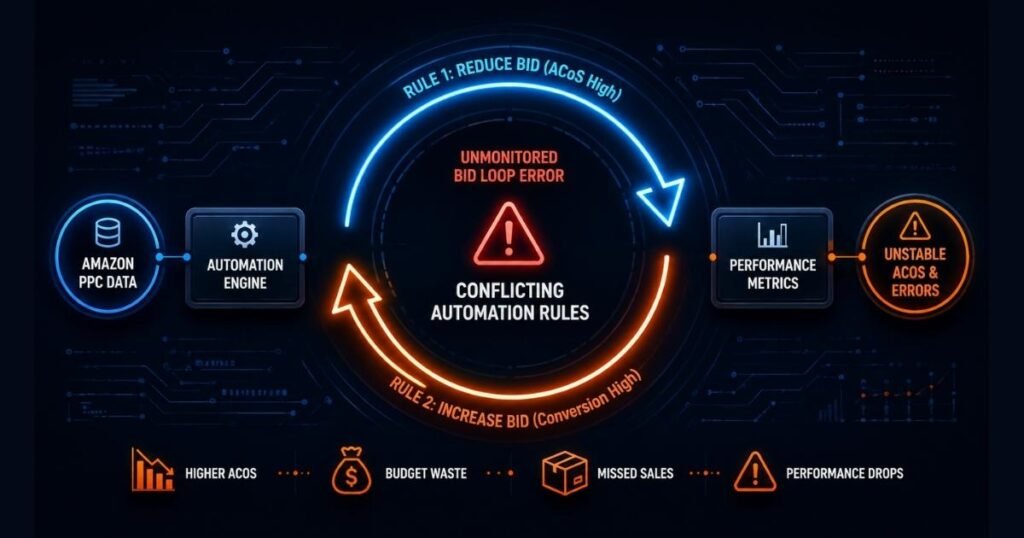
Bid loops. Two automated rules can work against each other. One rule raises a bid because conversion likelihood looks strong. Another rule lowers it because ACoS crossed a threshold. The keyword yo-yos between the two, and nobody notices unless someone is checking bid history, not just performance metrics.
Branded keyword mismanagement. This one comes up constantly. A general rule built around ACoS targets doesn’t account for the fact your branded terms should behave differently from generic ones. The tool applies the same logic everywhere and either overbids to protect a term that didn’t need it or underbids and lets a competitor’s ad sit above your own branded listing.
Stale rules on a changing account. A rule built in January for a product with a 4% conversion rate is still running in June, after a listing update pushed conversion to 7%. The rule hasn’t updated. It’s optimizing against numbers that no longer reflect reality.
Context blindness. Automation reacts to what happened. It doesn’t know why. A competitor’s stockout, a seasonal shift starting early, a review bomb dropping your conversion rate temporarily- none of that gets factored in unless a person steps in to override the rule.
Quick Tip: Create a calendar-based review schedule for each active automation rule rather than relying only on dashboard alerts. Monthly reviews may suit stable, lower-risk campaigns, while launches and high-spend campaigns may require weekly checks. Dashboards show what happened, but they do not confirm whether the rule still makes strategic sense.
Use this diagnostic checklist to catch a tool that’s technically running but quietly costing you money:
- Has ACoS crept up over 3 consecutive weeks with any rule adjustments
- Are branded keywords bidding at the same rate as generic ones?
- Do bid changes in the history log contradict each other within the same week?
- Has anyone reviewed the rule logic since it was first set up?
- Are new SKUs being added to existing automation rules before they have enough clicks, orders, and attributed sales for reliable decisions?
If you answer yes to two or more of these questions, start by auditing the rule design, tool settings, data inputs, and human-review process before expanding automation further.
The Hybrid Model That Actually Works
Many mature accounts benefit from a hybrid setup rather than relying entirely on manual work or unrestricted automation. They split tasks based on which one is genuinely better suited to each job.
What to hand to automation:
- Dayparting adjustments on high-volume, stable keywords with 60+ days of data
- Flagging or pausing search terms that cross product-specific spend, click, and conversion thresholds
- Bid adjustments on non-branded, mid-funnel terms with predictable conversion patterns
- Budget pacing across large campaign portfolios
What to keep manual:
- Branded keyword bids and protection
- New product launches under 60 days old
- Any keyword tied to a thin-margin SKU
- Campaign structure decisions and strategic pivots
- Reviewing why automation made a change, not just approving that it happened
Use the Risk, Repetition and Context Test:
Before automating any PPC task, score it against three questions:
- Risk: How much money or ranking visibility could one wrong action affect?
- Repetition: Does the task follow the same logic across many targets?
- Context: Does the decision require information about margin, inventory, launches, or competitors?
Tasks with high repetition but low strategic risk are strong automation candidates. Tasks with high risk or heavy business context should remain manual or require approval before execution.
Review cadence that actually works:
- Daily: check for anomalies on new launches and branded terms
- Weekly: review automation rule outputs against actual ACoS and TACoS targets
- Monthly: audit every active rule for relevance, using the checklist from the section above
This is close to how we run accounts at ScaleA2Z. Human strategists set the structure and make the judgment calls on branded terms, margin-sensitive SKUs, and new launches. Tools like Scale Insights support the process by handling repetitive bid execution on qualified keywords, but they don’t replace the review layer. A rule without a person checking its logic monthly is just an unmonitored risk with a dashboard attached.
A 30-Day Plan for Introducing PPC Automation Safely
Do not switch an entire Amazon Ads account to automation on the first day. Start with low-risk functions, document every change, and expand only after the results support it.
Week 1: Audit the Account
Review campaign structure, branded keyword separation, product margins, inventory risk, historical conversion data, and existing bidding settings. Identify campaigns that must remain under manual control.
Week 2: Automate Reporting and Alerts
Start with low-risk tasks such as budget alerts, CPC spikes, unusual spend increases, campaigns running out of budget, and conversion-rate changes. These functions surface problems without automatically changing bids.
Week 3: Test Limited Bid Rules
Apply automation to a small group of mature, non-branded targets with stable performance. Avoid new launches, high-spend branded terms, and margin-sensitive products during the initial test.
Record:
- The original bid
- The automation rule
- The campaign affected
- The date activated
- The review date
- The condition for reversing the change
Week 4: Review Before Expanding
Compare the test group against its previous performance and, where practical, against similar manually managed campaigns. Review ACoS, TACoS, CPC, conversion rate, total sales, contribution margin, and organic performance.Only expand automation when it improves execution without creating new profitability, inventory, or ranking problems.
Quick Tip: Begin with one controlled campaign group. Account-wide automation makes it difficult to identify which rule caused a positive or negative result.
How to Measure Which Approach Is Working
Whichever mix you land on, you need a way to know it’s actually working, not just running. Track advertising metrics at the campaign level, then review TACoS, profit, and organic performance at the product or account level.
At the Campaign Level
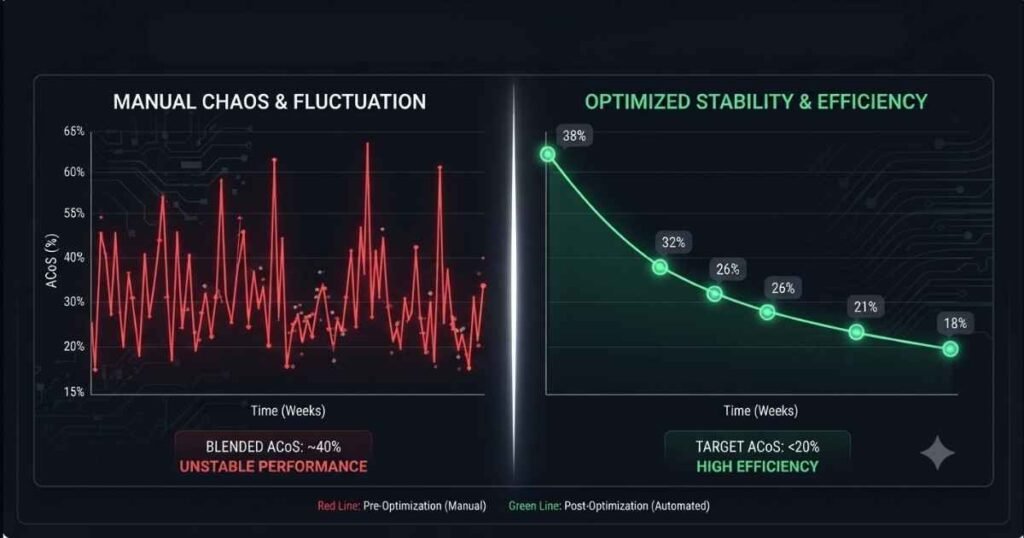
ACoS trend over rolling four-week windows. A single week can be noisy, while a longer window can reveal whether performance is genuinely improving or declining.
Bid-change frequency versus performance change. If bids change repeatedly but ACoS, CPC, or conversion rate stays flat, the automation logic may not be creating meaningful improvement.
Branded versus non-branded performance. These should not be evaluated through one blended ACoS because branded efficiency can hide weak generic targeting.
Time from anomaly to correction. Measure how long it takes for a person or rule to identify and correct unusual spend, CPC, or conversion changes.
At the Product or Account Level
- TACoS trend: Review whether advertising is contributing to total sales growth rather than only improving attributed ad efficiency.
- Contribution margin: A lower ACoS does not automatically mean higher profit if price, fees, discounts, or product costs have changed.
- Organic performance: Check organic sales and keyword visibility alongside paid performance.
- Inventory health: Confirm that bid or budget growth is not increasing stockout risk.
- Hypothetical example: Suppose a supplement seller has a blended ACoS of 34%, but branded and non-branded campaigns are grouped. After separating branded terms, the seller may discover that branded traffic is masking inefficient generic targeting. The next step would be to restrict automation to mature non-branded targets and measure whether ACoS, TACoS, and contribution margin improve over a defined testing period.
Quick Tip: If you can’t isolate branded ACoS from non-branded ACoS in your reporting right now, fix that before deciding whether automation is “working.” You’re likely looking at a number that hides the real story.
The Real Answer to Manual PPC vs Automation Tools
There’s no universal winner in the manual PPC vs automation tools debate. Manual management wins on judgment, branded protection, and new launches. Automation wins on scale, speed, and repetitive execution. The accounts that actually perform well use both, with a person deciding where the line goes and checking it regularly.
If your account has grown to the point where manual bid sheets can’t keep up, or you’ve tried automation and watched ACoS creep without knowing why, that’s usually a sign the split between manual and automated tasks needs a second look, not a full switch to one side or the other.
ScaleA2Z manages this balance daily across PPC accounts of every size, combining hands-on strategy with the right automation tools where they genuinely help. If you want a straight read on where your account stands, reach out for a free account audit, and we’ll show you exactly what should stay manual and what’s safe to automate.
Frequently asked questions
Which works better for Amazon Ads: manual PPC vs automation tools?
Neither is universally better. Manual PPC works best for branded keywords, new launches, and thin-margin SKUs where judgment matters. Automation works best for large catalogs, repetitive bid tasks, and keywords with 60+ days of stable conversion data. Most well-run accounts use both.
What's the difference between Amazon's dynamic bidding and third-party PPC automation software?
Amazon’s dynamic bidding (Dynamic Bids Down Only, Dynamic Bids Up and Down, Fixed Bids) is native to Campaign Manager and only affects bid amount based on conversion likelihood. Third-party automation software sits on top of your account and can adjust bids, budgets, and keywords using its own rules or machine learning, independent of Amazon’s built-in options.
Can automation software hurt my Amazon PPC account?
Yes, if it runs without regular human review. Common failure points include bid loops between conflicting rules, branded keywords bid the same as generic terms, and rules that go stale after a listing or conversion rate change. The tool itself usually isn’t the problem, unmonitored rules are.
How much conversion data does automation need before it works well?
There is no universal minimum. A mature, high-volume target may produce useful data faster than a low-volume product. As a practical starting point, review several weeks of clicks, orders, and attributed sales before allowing automation to make aggressive bid or pause decisions.
Should I automate my branded keyword campaigns?
Branded campaigns should not be placed inside broad rules designed for generic keywords. They can remain manual or use separate, tightly controlled automation based on branded conversion rates, incremental value, impression share, and competitive pressure. Review them independently rather than judging them through blended account-level ACoS.
What's a hybrid PPC management approach?
A hybrid approach splits tasks between automation and manual management based on what each is better suited for. Automation typically handles repetitive bid execution on stable, non-branded keywords. Manual management covers branded terms, new launches, margin-sensitive SKUs, and strategic decisions, with regular audits of what automation is doing.
How often should I review my Amazon PPC automation rules?
At minimum, monthly. Weekly reviews are better for high-spend accounts. A rule that made sense when it was created can become inaccurate after a listing change, price change, or conversion rate shift, so scheduled audits matter more than dashboard alerts alone.