Why Auto Campaigns Waste 70% of Budget (And How to Fix It Fast)
If your Amazon auto campaign keeps spending while orders stay flat, the problem is usually not automatic targeting itself. The waste often comes from weak targeting controls, irrelevant shopping queries, poor bid decisions, and search terms that continue receiving clicks after the data shows they are unlikely to meet your profitability target.
That is how a large share of an ad budget can disappear before you notice it. The “70%” in this guide is not a universal Amazon benchmark. It represents the kind of severe budget waste that can occur when automatic campaigns are left without enough control. Your actual wasted-spend percentage depends on your product, bids, conversion rate, margins, competition, and campaign data.
You also do not need to shut down every automatic campaign. Amazon automatic targeting can be useful for discovering shopping queries and product opportunities that can later inform more controlled campaigns.
In this guide, we will diagnose where Amazon auto campaigns waste budget, show you which metrics to check first, and explain when to lower a bid, add a negative target, harvest a search term, or leave the campaign alone.
If wasted spend is affecting the wider account, our Amazon PPC Management approach focuses on search-term analysis, bid adjustments, campaign structure, and profitability rather than simply increasing spend.
Table of Contents
What Is an Amazon Auto Campaign?
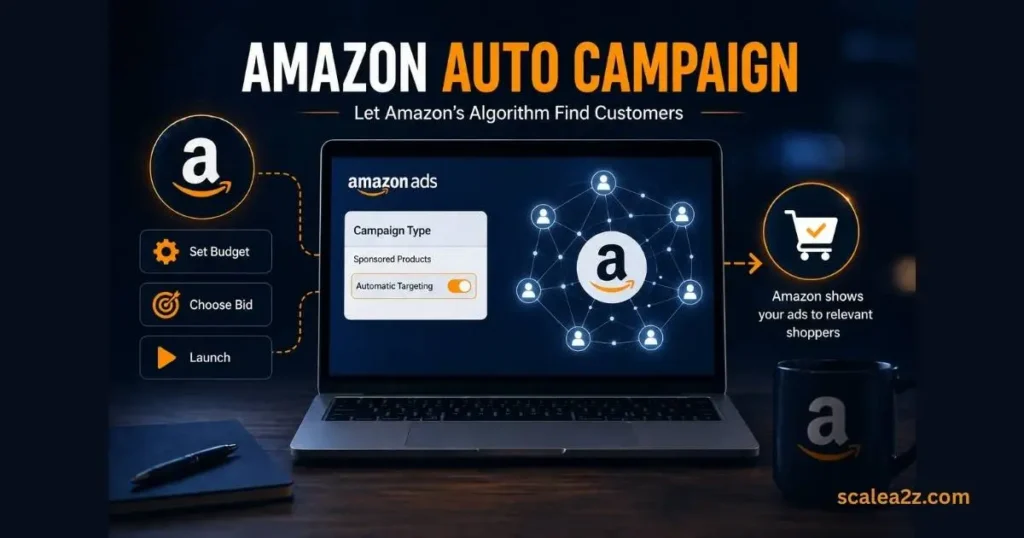
An Amazon auto campaign is a Sponsored Products ad type in which Amazon’s algorithm decides who sees your ads. You set a budget, choose a bid, and Amazon handles the rest — matching your product to search queries it thinks are relevant.
On the surface, it sounds like a great deal. No keyword research, no manual targeting, just let the algorithm work. That is exactly why so many sellers over-rely on it.
How Amazon Auto Targeting Works
When you launch an auto campaign, Amazon Automatic Targeting uses four targeting groups: Close Match, Loose Match, Substitutes, and Complements. Close Match targets searches closely related to your product. Loose Match casts a much wider net. Substitutes show your ads on competitor product pages, and Complements target related product categories.
The problem starts when Amazon’s matching decisions and your profitability goals are not aligned. Automatic targeting can help discover relevant shopping queries and products, but you still need to evaluate each targeting group against your own ACoS, conversion, margin, and growth targets.
Without proper controls, Loose Match and Substitutes can quietly drain your budget on traffic that rarely converts. For a deeper look at keyword targeting, see our Exact vs Phrase vs Broad Match guide.
Auto vs Manual Campaigns
With manual campaigns, you decide exactly which keywords or ASINs to target, what bids to set, and how to structure your ad groups. Auto campaigns give Amazon that control instead.
Automatic campaigns are useful for discovering search and product-targeting opportunities, while manual campaigns give you more direct control over the keywords, products, bids, and placements you choose to scale. Running only auto campaigns is like letting someone else drive your car without telling them the destination.
5 Reasons Auto Campaigns Waste Budget
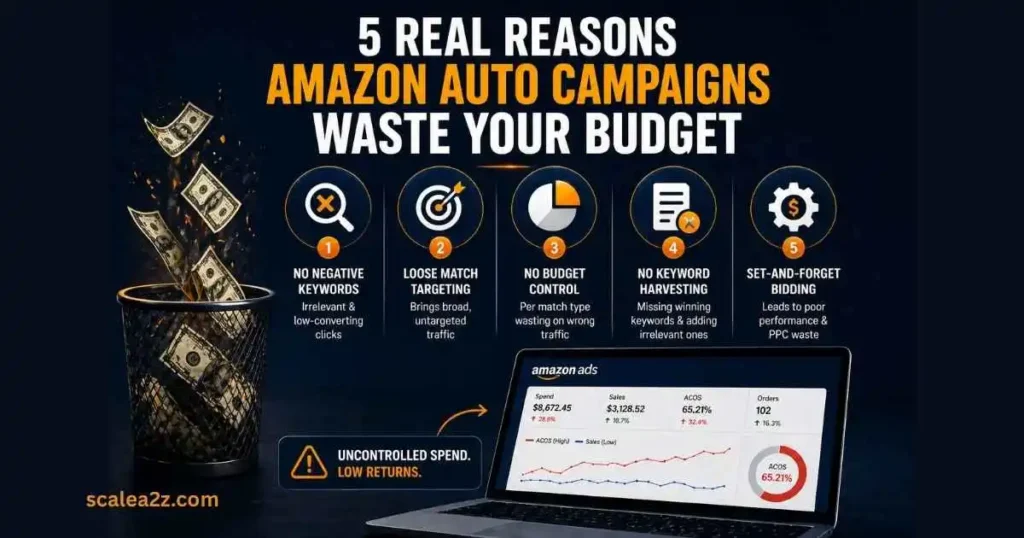
Most sellers assume auto campaigns are underperforming because of competition or low demand. The real issue is almost always structural. Here are the five most common reasons your auto campaign is quietly burning through your ad budget.
1- No Negative Keywords = Irrelevant & Low-Converting Clicks
This is the single biggest cause of wasted ad spend on Amazon. When you launch an auto campaign without a negative keyword list, you are essentially telling Amazon — show my ads to everyone. And Amazon will do exactly that.
Your ads start appearing for searches that have nothing to do with your product. Someone searching for a completely different category clicks your ad, does not buy, and you just paid for that click. Multiply that by hundreds of clicks a week, and you can see how fast the budget disappears.
Negative targeting becomes essential once irrelevant or inefficient traffic is identified. You can also add obvious irrelevant terms before launch, but avoid building an oversized negative list before the campaign has generated enough data to show how shoppers actually find your product.
2- Loose Match Targeting Brings Broad, Untargeted Traffic
Out of the four auto-targeting types, Loose Match is the most aggressive. It shows your ads to shoppers based on loosely related search terms — often far removed from what your product actually is.
For example, if you are selling a stainless steel water bottle, Loose Match might show your ad to someone searching for plastic cups or gym accessories. They might click out of curiosity, but the intent to buy your specific product simply is not there.
The fix is not automatically turning Loose Match off or forcing it to an arbitrary minimum bid. Start with a conservative bid relative to your other targeting groups, then adjust it using CPC, conversion rate, ACoS, and search-term relevance. If Loose Match discovers useful queries profitably, it may deserve more investment.
If it repeatedly spends without producing acceptable results, reduce the bid or restrict the waste with negative targeting.
3- One Shared Budget Can Hide Targeting-Group Waste
An automatic campaign uses one campaign budget, but that does not mean every targeting group needs the same bid. Amazon lets you manage bids separately for Close Match, Loose Match, Substitutes, and Complements.
The real problem is failing to review those targeting groups individually. If one group keeps spending above your acceptable ACoS while another converts efficiently, leaving both on similar bids can direct too much spend toward the weaker traffic.
Review spend, sales, ACoS, conversion rate, and CPC by targeting group. Lower bids where efficiency is weak and protect the groups that are meeting your campaign objective. Separate campaigns can provide even tighter budget control when the account has enough data and complexity to justify the extra structure.
4- No Keyword Harvesting from Search Term Data
Your auto campaign is constantly generating search term data — real queries that real shoppers typed in before clicking your ad. The report is useful only when you turn the data into decisions. Ignoring it means profitable queries and obvious sources of wasted spend can remain hidden inside the same campaign.
Without a regular keyword harvesting process, you miss the converting search terms that should be moved into manual exact match campaigns, where you can control bids and scale them properly. You also miss the non-converting terms that should be added to your negative keyword list.
Pulling your Search Term Report weekly from Amazon Seller Central and acting on it is what separates sellers who scale from those who keep wasting budget month after month.
5- Set-and-Forget Bidding Leads to PPC Waste
Auto campaigns are easy to launch and easy to forget. You set a default bid, hit go, and assume Amazon will optimize things over time. It will not — at least not in the direction of your profitability.
Bids that made sense on day one may be completely wrong by week three as competition shifts, search trends change, and your own conversion data comes in. Without regular bid adjustments based on actual performance data — ACoS, conversion rate, click-through rate — your campaign keeps spending at the wrong rate on the wrong terms.
At ScaleA2Z, we use AI-driven data analysis and tools like Scale Insights to monitor bid performance and make consistent adjustments, keeping campaigns efficient rather than just active.
Signs Your Amazon Auto Campaign Is Wasting Money
Before you can fix the problem, you need to recognize it. Here are the clearest signs that your auto campaign is draining budget without delivering real results.
- High spend, low conversions — Your campaign is getting clicks, but orders are not following. That gap between spend and sales is pure waste.
- Rising ACoS and TACoS — When both keep climbing week over week, your ads are working harder but profiting less.
- Irrelevant search terms in your STR — Open your Search Term Report, and you will find searches that have no business triggering your ads.
- No keyword control — You have no idea which match type is consuming most of your budget.
- CTR is weak relative to comparable campaigns — A declining or unusually low CTR can indicate weak search relevance, an uncompetitive main image or offer, or targeting that is reaching shoppers with low purchase intent. Diagnose it alongside impressions, CPC, conversion rate, placement, and search-term relevance rather than relying on one universal CTR cutoff.
If two or more of these apply to your account right now, your auto campaign needs immediate attention.
Which Auto Targeting Group Wastes Budget?
Looking only at campaign-level ACoS can hide the real source of wasted spend. Amazon automatic targeting uses four targeting groups, and each one can behave very differently. Before you pause the entire campaign, compare Close Match, Loose Match, Substitutes, and Complements separately.
Spending Heavy Without Converting?
Close Match connects your product with shopping queries closely related to the ASIN. If it spends heavily without converting, do not immediately blame the targeting group. Check CPC, search-term relevance, price competitiveness, reviews, and listing conversion first.
Broad Reach vs Weak Intent
Loose Match gives Amazon more flexibility to connect your product with broader related searches. It can uncover new demand, but it can also accumulate low-intent clicks. Review the actual shopping queries and reduce bids when relevance or efficiency consistently falls below your target.
Check the Placement, Not Just the Group
Substitutes can place your ad around products shoppers may consider instead of yours. Review which ASINs generate clicks, orders, and profitable sales. A few poor product-page placements can make the entire targeting group look worse than it actually is.
Judge It By Discovery Role
Complements connects your product with items Amazon considers related to yours. This traffic may have weaker immediate purchase intent, so judge it using product relevance, CPC, conversions, and the role it plays in your discovery strategy.
Amazon also supports different bid settings for automatic targeting expressions, so sellers don’t need to treat all four groups identically.
Quick Tip: Diagnose the targeting group before pausing the campaign. One weak group does not automatically mean the entire auto campaign is wasting money.
How to Audit Your Amazon Auto Campaign
Running an audit does not have to be complicated. Three focused steps will show you exactly where your budget is leaking.
Amazon Ads console / Advertising reports
Go to Amazon Seller Central, navigate to Reports, then Advertising Reports, and download your Search Term Report. Set the date range to the last 30 days minimum. This report shows every search query that triggered your ad and how much you spent on each one. If you haven’t set up a regular STR review process yet, our Search Term Mining SOP covers the full workflow — here we’re focused on using that data specifically to catch auto-campaign waste.
Identify High-Spend, Zero-Conversion Keywords
Sort search terms by spend and identify queries that have generated meaningful click volume without producing sales. Do not use a universal $10 cutoff because the amount of spend required to judge a term depends on your CPC, product price, conversion rate, and acceptable acquisition cost.
For example, Amazon Ads recommends evaluating performance after a target has received at least 20 clicks before deciding whether to add it as a negative target. Your own profitability threshold may require a different decision framework.
For each weak search term, ask three questions: Is it relevant to the product? Has it received enough traffic to judge fairly? Has its spend exceeded what you can reasonably afford for one order? An irrelevant query may deserve an immediate negative, while a relevant but underperforming query may need a lower bid or more data.
Compare ACoS with Break-Even ACoS
Break-even ACoS tells you approximately how much of an ad-attributed sale you can spend on advertising before that sale stops contributing profit, based on the costs included in your calculation.
Do not assume that a headline gross-margin percentage is automatically your usable break-even ACoS. Start with the selling price and subtract relevant product costs, Amazon fees, fulfillment costs, discounts, and other variable costs you want included in the decision.
For example, if a $40 product leaves $12 in contribution margin before advertising, the simplified break-even ACoS is 30%:
$12 ÷ $40 × 100 = 30%
If a search term is consistently operating well above that threshold, investigate its bid, CPC, conversion rate, placement, and strategic purpose before continuing to fund it.
Quick Auto Campaign Decision Table
| What You See | Likely Issue | First Action |
|---|---|---|
| Relevant term + profitable sales | Product-market fit is working | Keep or cautiously scale |
| Relevant term + high spend + no sales | Bid/CVR/offer problem | Reduce bid and investigate listing |
| Irrelevant term + clicks | Targeting mismatch | Consider negative targeting |
| Converting search term in auto | Proven discovery opportunity | Test in manual targeting |
| Weak targeting group overall | Group-level inefficiency | Lower that group's bid |
| Strong CTR + weak CVR | Post-click problem | Review price, listing, reviews and offer |
| Weak CTR + weak CVR | Relevance or offer issue | Review query relevance before adding spend |
Quick Answer: Start by identifying where spend is concentrated, then compare search-term relevance, clicks, orders, CPC, conversion rate, and ACoS against your profitability threshold. Do not pause an entire campaign based on campaign-level ACoS alone. Find whether the problem is a search term, targeting group, bid, listing conversion issue, or campaign objective.
Lower the Bid, Add a Negative, or Leave It Alone?
Not every underperforming search term needs the same response. The right action depends on relevance, spend, conversions, CPC, and whether the term has collected enough data to judge fairly.
Lower the bid when the term is relevant but CPC or ACoS is too high. Reducing the bid gives the query another chance to convert at a more sustainable acquisition cost.
Add a negative when the search term is clearly irrelevant, has the wrong shopper intent, or continues consuming meaningful spend after enough data shows poor performance.
Keep it running when relevance is strong but the term has not collected enough clicks or spend to support a confident decision.
Move it into manual targeting when the term repeatedly generates orders at an acceptable efficiency level and you want greater control over bidding and placement.
Quick Tip: Don’t optimize based on one metric alone. A high ACoS caused by one expensive click needs a different response from a high ACoS built across dozens of clicks with no orders.
How to Fix Amazon Auto Campaigns
Now that you know where the waste is coming from, here is how to fix it — without shutting everything down and starting over.
Build a Strong Negative Keyword List
Start here before anything else. Go through your Search Term Report and pull every irrelevant, low-intent, or zero-conversion search term. Add them as negative exact and negative phrase match keywords at the campaign level.
Do not aim for an arbitrary number of negative keywords. Add negatives when the data or product relevance justifies them. Use negative exact when you need to block a specific shopping query and negative phrase when an entire phrase and its relevant variations are clearly unsuitable for the campaign.
Review negative targeting regularly, but avoid over-negating terms before they have enough data to make a fair decision. The more irrelevant traffic you block, the more budget you free up for searches that actually convert. Revisit and update this list every week — it is a living document, not a one-time task.
Use Auto Campaigns Only for Keyword Discovery
Automatic campaigns are valuable for discovery, but keyword discovery is not their only possible role. Amazon positions automatic targeting as a way to match ads with relevant shopping queries and products while also generating insights that can inform manual campaigns.
Give the campaign a defined objective. It might be discovering new search terms, finding product-targeting opportunities, supporting a new ASIN, or maintaining profitable incremental traffic. The key is to judge it against that objective instead of assuming every automatic campaign must eventually be replaced.
Harvest Winning Keywords into Manual Exact Campaigns
Every week, go back to your Search Term Report and Look for search terms that have generated enough conversions to show a meaningful pattern and are performing within your acceptable efficiency range. Order count matters, but so do ACoS, conversion rate, CPC, relevance, and total spend.
A term with three orders at an unprofitable ACoS is not automatically a winner. Likewise, a highly relevant term with fewer orders may still deserve a controlled manual test. Move promising queries into an appropriate manual campaign when additional control is justified. For a proven search term, exact match can give you more direct control over the bid, budget, and performance of that target.
This process — keyword harvesting — is what turns your auto campaign data into actual profit. Without it, your best-performing search terms stay buried inside an uncontrolled auto campaign where you cannot properly scale them.
For the full promote, negate, and monitor workflow, see our Amazon Search Term Mining SOP.
Set Smart Bid Rules
Do not assign bids based only on the targeting-group name. Close Match may deserve a higher bid in one account while Substitutes may outperform it in another. Start with controlled bids, then adjust each targeting group using CPC, conversion rate, ACoS, search relevance, and campaign objective.
Choose the bidding strategy according to the campaign objective. Dynamic bids down only can be useful when efficiency and ROAS control are priorities because Amazon can reduce bids when a conversion appears less likely. Dynamic bids up and down may be appropriate when you are willing to bid more aggressively for conversion opportunities.
Whichever strategy you use, review targeting-group performance and avoid treating the bidding setting as a substitute for search-term, bid, and profitability analysis.
Run Weekly Optimization
Monthly optimization is not enough. A lot of the budget can be wasted in 30 days. Set aside 30 minutes every week to review your Search Term Report, update negatives, adjust bids based on ACoS performance, and harvest new converting terms.
At ScaleA2Z, we use AI-driven data analysis alongside tools like Scale Insights to track bid performance and make consistent weekly adjustments — keeping campaigns efficient and profitable rather than just running on autopilot.
Auto vs Manual Budget Split
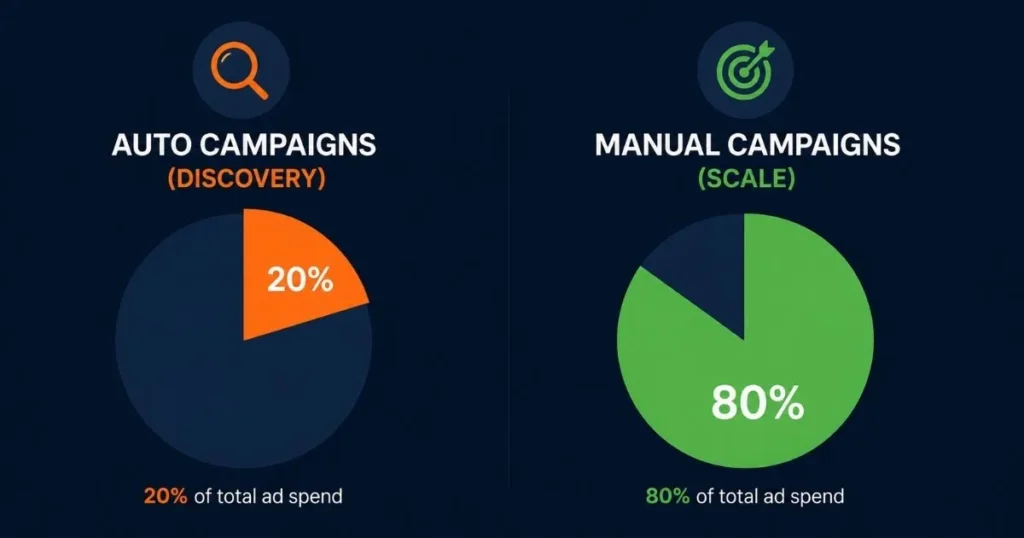
One of the simplest ways to stop Amazon auto campaigns from wasting budget is to set a clear spending boundary from the start.
There is no universal budget split that fits every Amazon account. However, a 20% automatic and 80% manual starting allocation can be a useful planning benchmark for some established ASINs. Amazon Ads also uses approximately this split in its standard-ASIN strategy guidance.
Treat it as a starting point, not a fixed rule. A new product that needs discovery may temporarily justify more automatic-targeting spend, while a mature account with strong keyword history may put a larger share into proven manual campaigns.
If your monthly PPC budget is $1,000, for example, you could initially test $200 in automatic campaigns and $800 in manual campaigns, then reallocate based on profitable sales, search-term discoveries, and campaign objectives. For full budget scaling and TACoS strategy across your account, see our guide on scaling Amazon ads.
How Auto and Manual Campaigns Work Together
Sellers who consistently lower their TACoS and scale profitably are not doing anything magical — they are just more disciplined about structure and data.
The approach starts with a proper campaign funnel — auto campaigns feed data into manual broad, manual phrase feeds into manual exact. Each layer is intentional and connected.
From there, everything is driven by data. Bids are adjusted based on actual ACoS performance, not guesswork. Winning search terms are harvested weekly and pushed into exact match campaigns where they can be properly scaled.
If your campaigns overlap or budgets are difficult to control, see our guide to fixing Amazon PPC campaign structure.
Final Thoughts on Auto Campaign Waste
Auto campaigns are not the problem. Lack of control is. The moment you stop treating auto campaigns as a complete strategy and start giving each auto campaign a defined role and measuring it against that objective, everything changes. Your ACoS comes down, your manual campaigns get stronger, and your ad budget starts working the way it should.
The sellers who scale profitably on Amazon are not necessarily spending more — they are spending smarter. Better structure, consistent weekly optimization, and disciplined keyword harvesting make the difference.
At ScaleA2Z, this data-driven and structured approach to PPC management is how we help brands stop the bleed and start building campaigns that actually grow their business. Every day you delay optimization is more budget lost to irrelevant clicks.
If you want help identifying where your campaigns are leaking spend, explore ScaleA2Z’s Amazon Ads Management service.
Frequently Asked Questions About Amazon Auto Campaigns
Why is my Amazon auto campaign spending so much?
One common reason is uncontrolled search-term matching combined with weak negative targeting and bids that continue funding low-converting traffic. Without appropriate negative targeting, irrelevant queries can continue generating paid clicks. Every irrelevant click costs you money without bringing you closer to a sale. On top of that, Loose Match targeting and set-and-forget bidding allow spend to accumulate fast without any guardrails. The fix starts with pulling your Search Term Report, identifying zero-conversion search terms, and adding them to your negative keyword list immediately.
Should I turn off my Amazon auto campaign?
Not necessarily. Keep an auto campaign running when it is generating useful discoveries, profitable sales, product-targeting opportunities, or strategically valuable data. Reduce its bids or budget when efficiency is weak, and pause it only when the data shows that continued spend no longer supports the campaign objective.
What is a good ACoS for an Amazon auto campaign?
There is no universal good ACoS for an Amazon auto campaign. Your acceptable ACoS depends on contribution margin, product lifecycle, campaign objective, organic ranking goals, and how aggressively you are investing in discovery. Compare actual ACoS with your break-even threshold and business objective rather than using a generic industry percentage.
How often should I optimize Amazon PPC campaigns?
A weekly review is a practical cadence for many active accounts, but optimization frequency should depend on spend and data volume. A high-spend campaign may need closer monitoring, while a low-volume campaign may need more time before the data supports meaningful changes.
For an account that generates enough weekly data, review the Search Term Report, negatives, bids, and new converting terms each week. Lower-volume campaigns may need a longer evaluation window before changes are justified.
How do I harvest keywords from Amazon auto campaigns?
Go to Amazon Seller Central, download your Search Term Report, and filter by conversions. Any search term with three or more orders is a strong candidate for harvesting. Take those terms and add them as keywords in a manual exact match campaign where you can set a dedicated bid and properly scale their performance. At the same time, any term with significant spend and zero conversions goes straight to your negative keyword list. This weekly process is what turns raw auto campaign data into a structured, profitable manual campaign strategy.
Are Amazon auto campaigns good for beginners?
Yes — but only if used correctly from the start. For beginners, auto campaigns offer a low barrier to entry since Amazon handles the targeting. They are a practical way to start collecting search term data without needing deep keyword research upfront. However, beginners often make the mistake of relying on auto campaigns as their entire PPC strategy, which leads to uncontrolled spend and high ACoS. The right approach is to use auto campaigns to learn what your customers are searching for, then gradually build manual campaigns around that data as confidence and budget grow.