Amazon SEO Mistakes 90% of Sellers Make (And How to Fix Them)
Most Amazon sellers don’t have a product problem. They have a visibility problem. You could be selling something genuinely great, priced competitively, with solid reviews — and still watch it sit on page three while a weaker competitor takes the Buy Box and all the traffic that comes with it. In almost every case, the gap often comes down to Amazon SEO mistakes that quietly weaken visibility, reduce clicks, and send sales to competitors with better-optimized listings.
If you’ve been following Amazon search ranking tips but still aren’t seeing results, chances are one or more of these Amazon product ranking mistakes are holding you back. If you’d like to see how these issues look inside a real account, our 90-day Amazon growth plan walks through the process we use to diagnose and fix them for every brand we work with.
Table of Contents
What Are the Biggest Amazon SEO Mistakes?
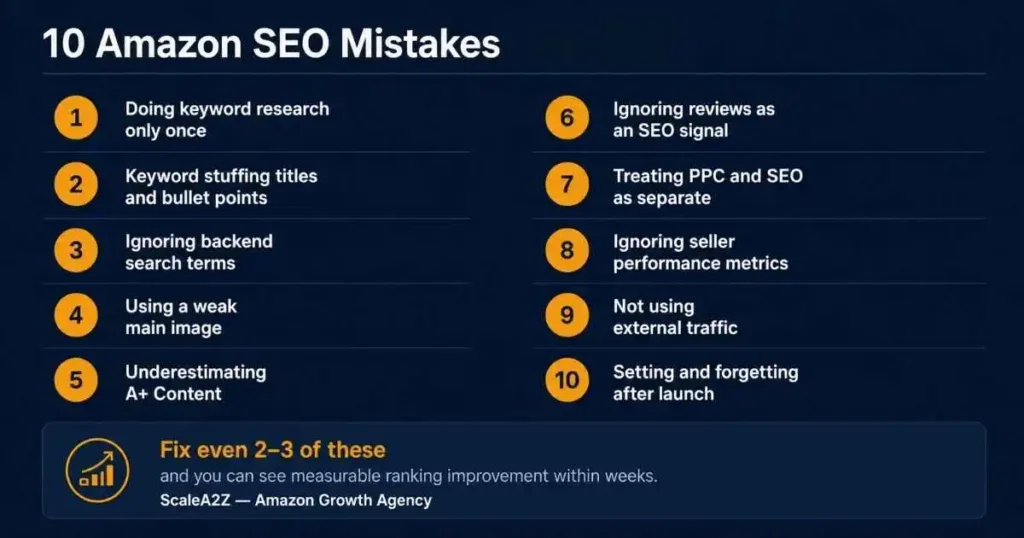
The biggest Amazon SEO mistakes include neglecting regular keyword research updates, stuffing titles with repeated keywords, leaving backend keyword fields empty, using weak main images that hurt click-through rates, underusing A+ Content as a conversion and trust-building layer, treating PPC and organic strategy as separate systems, and failing to audit listings after launch. These mistakes compound over time — each one weakens a signal Amazon’s algorithm uses to determine ranking, which means fixing even two or three can produce measurable ranking improvement within weeks.
What Is Amazon SEO and Why Does It Matter?
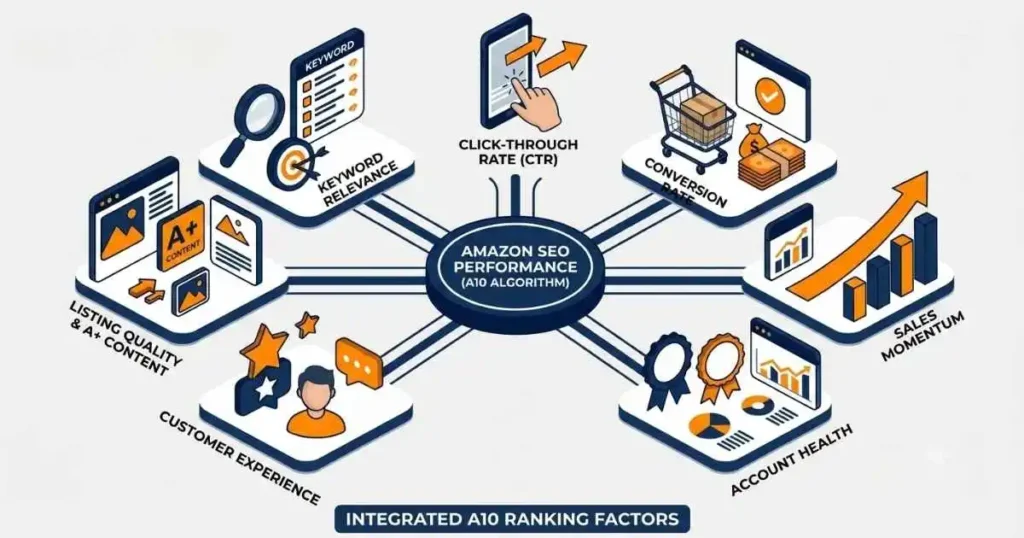
Amazon SEO is the process of optimizing your product listings so they rank higher in Amazon’s search results. When a shopper searches for “insulated water bottle” or “foam roller for back pain,” Amazon’s search system, often referred to by sellers as A9 or A10, decides which products appear for each query based on signals like keyword relevance, click-through rate, conversion rate, sales momentum, seller performance, and customer experience.
Every element of your listing — title, bullet points, images, backend search terms, A+ Content, product description, and seller account health — either helps or hurts your position. The higher your product appears in Amazon search results, the more likely it is to earn clicks and sales. Listings buried beyond the first page often struggle to get meaningful visibility.
It’s also worth noting that these Amazon listing optimization mistakes don’t just hurt rankings — they make your PPC campaigns more expensive too, since you’re paying to send traffic to a listing that can’t convert. Our post on why you’re spending more on ads but not growing explains exactly how these two problems are connected.
Amazon SEO Mistakes and How to Fix Each One
Doing Keyword Research Only Once
This is one of the most widespread Amazon keyword research mistakes, and it costs sellers more than they realize. Most do their research at launch, build their listing around those terms, and never revisit them. Six months later, search trends have shifted, new long-tail keywords have emerged, and the original strategy is quietly becoming outdated.
How to fix it: Build a keyword audit into your calendar every 60 to 90 days. Use Helium 10’s Cerebro or Magnet, Jungle Scout’s Keyword Scout, Amazon’s Brand Analytics Search Query Performance report, and your PPC reports to identify what’s gaining traction and what gaps your competitors are filling. Our search term mining workflow shows the exact step-by-step process we use to turn this data into ranking improvements. Long-tail keywords are particularly valuable — a phrase like “ergonomic lumbar support pillow for office chair” has far more specific buyer intent than “lumbar pillow,” and those searchers convert at a much higher rate.
Keyword Stuffing Titles and Bullet Points
Keyword stuffing remains one of the most common Amazon SEO mistakes in 2026. It happens when a title reads like: “Water Bottle Insulated Stainless Steel BPA Free Thermos Travel Cup Flask 32oz” — a string of search terms with no real value to the reader.
Amazon’s current policy limits most categories to 200 characters in the title, with no word appearing more than twice. Violating these rules can trigger listing suppression. But even within the limits, stuffed titles hurt performance — shoppers don’t click on keyword lists, they click on listings that communicate a clear value proposition. A poor click-through rate signals to the algorithm that your listing is less relevant, which pushes it further down. The same problem applies to bullet points crammed with terms instead of benefits.
What to do instead: Write for the human first, algorithm second. Lead with your most important keyword, then complete the sentence with real value. Use your bullet points to answer the questions shoppers are asking before they buy, and weave supporting keywords naturally into those answers. If you’re building a listing from scratch, our guide on how to launch a new product on Amazon covers how to structure titles and bullets the right way from day one.
Ignoring Backend Search Terms
Amazon gives sellers a useful optimization field inside Seller Central: backend search terms. Shoppers do not see these fields, but they help Amazon understand additional relevant terms for your product. These fields are perfect for synonyms, alternate spellings, regional variations, complementary use cases, and misspellings — all the keywords that wouldn’t fit naturally in your visible listing.
Do this instead: Treat backend search terms as a separate keyword layer. Include misspellings, spelling variations (“grey” vs “gray”), synonyms, and bilingual equivalents if your category has a bilingual audience. Don’t use commas — Amazon reads them as separators and wastes characters. Keep input under 250 bytes to avoid truncation, and never repeat keywords already in your title.
Using a Weak Main Image
Your main image is doing more SEO work than most sellers realize. The A10 algorithm uses click-through rate as a meaningful ranking signal — if your listing appears in search results and gets fewer clicks than a competitor’s, the algorithm adjusts your ranking down. Your main image is the single biggest driver of whether someone clicks at thumbnail scale, which is how most shoppers first see your listing on mobile.
The better approach: Invest in a professional main image on a pure white background. The product should fill at least 85% of the frame at a minimum of 1,000 x 1,000 pixels. If you’re Brand Registry enrolled, use Manage Your Experiments to A/B test two image variations — even a modest CTR gain compounds into significant ranking improvement over time. Our creative management service handles listing images, A+ Content, and brand store design built around conversion performance.
Underestimating A+ Content
Many sellers treat A+ Content as purely a conversion tool — a visual upgrade for shoppers, but invisible to the algorithm. That’s not accurate. While A+ Content is best understood as a conversion and trust-building layer, its descriptive image alt text can help shoppers and search engines better understand the product. Avoid keyword stuffing and write alt text that naturally describes the image. Sellers who skip A+ Content may be missing an important opportunity to improve trust, product understanding, and conversion.
A+ Content can improve conversion rate, and stronger conversion can indirectly support organic performance over time. Better conversion feeds back into higher organic ranking, and the two effects reinforce each other.
How to fix it: If you’re Brand Registry enrolled, publish A+ Content on every listing. Write natural, keyword-inclusive sentences as alt text, not keyword lists. Use the product comparison module to highlight differentiation, and include a brand story module to build the engagement signals that the algorithm rewards.
Ignoring Reviews as an SEO Signal
Reviews influence rankings in two ways. The obvious one is conversion rate — better reviews convert better, and better conversion drives rankings higher. The less obvious one is review content: Reviews can reveal useful buyer language, common use cases, and objections that should be reflected in your listing copy.
The language customers use in reviews — the exact phrases describing benefits and use cases — is often the same language they’d use to search for it. Ignoring this is a genuine Amazon listing optimization mistake that leaves keyword intelligence sitting unused.
What to do instead: Use review mining as an active research method. Read your best reviews and top competitors’ reviews for recurring phrases and use cases not in your current listing copy or product description. If customers keep saying “perfect for meal prep,” that phrase deserves space in your bullets or enhanced content. For review generation, enroll in Amazon Vine for new launches and use the Request a Review button in Seller Central after every order. Aim for 15 to 30 genuine reviews before scaling ad spend significantly.
Treating PPC and SEO as Separate Strategies
This is one of the most expensive Amazon seller SEO errors because it damages both sides simultaneously. Many sellers run PPC in one bucket and manage listing SEO in another, never connecting the two. In reality, they’re a single system.
PPC campaigns generate sales velocity, one of Amazon’s most important ranking signals. When ads drive conversions on specific keywords, the algorithm interprets that as evidence that your listing is relevant and improves your ranking for those terms. Meanwhile, a poorly optimized listing that can’t convert paid traffic pushes ACoS and TACoS higher while sending negative signals that hurt organic ranking. Your PPC reports are also some of the most valuable keyword intelligence available for listing optimization — they show you which exact queries are triggering real purchases right now.
The better approach: Feed converting PPC keywords directly into your listing copy and backend fields. Our Amazon PPC management process uses AI-driven data analysis — including tools like Scale Insights — to identify converting keywords and feed those insights into listing optimization decisions.
Ignoring Seller Performance Metrics
The A10 algorithm doesn’t just evaluate your listing — it evaluates the seller behind it. Seller authority, encompassing your account health score, Order Defect Rate (ODR), late shipment rate, cancellation rate, and customer message response time, directly influences how Amazon treats your products in search.
An ODR above 1% or a pattern of unresolved complaints can suppress listings even when your listing SEO is solid. The connection between account health and organic ranking isn’t obvious, but it’s real.
Do this instead: Make account health a weekly habit, not a monthly check-in. Keep ODR below 1%, late shipment rate under 4%, and cancellation rate under 2.5%. Respond to customer messages within 24 hours. FBA sellers benefit from automatic Prime eligibility, which signals fulfillment quality to the algorithm and provides a ranking lift. FBM sellers need to match FBA fulfillment standards as closely as possible to remain competitive.
Not Using External Traffic
Relevant external traffic can support sales momentum when it converts. Use Amazon Attribution to measure which off-Amazon channels are driving clicks, detail page views, and purchases.
How to fix it: Enroll in Amazon Attribution, free for Brand Registry members. It creates tracking links for external campaigns so you can measure exactly which sources are driving clicks and purchases. A well-timed email or relevant social post can send qualified traffic that supports clicks, sales, and overall listing momentum. Focus on quality over volume — low-quality traffic that doesn’t convert can hurt your conversion rate metric and work against your ranking.
Setting and Forgetting After Launch
The most common long-term Amazon listing mistake is treating optimization as a one-time task. Sellers launch, see initial results, and move on. Meanwhile, competitors update their listings, claim new keywords, improve their images, and gradually take over positions you once held.
What to do instead: Build a quarterly listing audit into your workflow. Every 90 days, review keyword rankings, CTR via the Search Query Performance report in Brand Analytics, conversion rate trends, competitor positioning, and recent negative reviews for product description accuracy issues. Small, consistent improvements compound over time — and that discipline is what separates sellers who grow from sellers who plateau.
Amazon SEO Audit Checklist
Use this quick checklist to review any Amazon listing and spot ranking gaps before they start costing you sales:
- Keyword research has been updated in the last 60–90 days using Brand Analytics, Helium 10, Jungle Scout, or PPC search term data.
- The title is human-readable, starts with the primary keyword naturally, and stays within the category character limit.
- No important word is repeated more than twice in the title.
- Bullet points answer real buyer questions and include secondary keywords naturally.
- The product description is accurate, keyword-inclusive, and adds information not already covered in the bullets.
- Backend search terms are filled, under 250 bytes, and do not repeat title keywords.
- The main image is high-resolution, mobile-friendly, and the product fills at least 85% of the frame.
- A/B testing is active through Manage Your Experiments if Brand Registry is available.
- A+ Content is published with descriptive alt text on every image module.
- A compliant review request strategy is active, with enough authentic reviews to support buyer trust.
- PPC keyword data has been reviewed and used to improve listing copy and backend search terms.
- Account health has been checked this week, including ODR, response time, late shipment rate, and cancellation rate.
- Amazon Attribution is active for any external traffic campaigns.
If you checked fewer than eight of these boxes, your listing likely has ranking gaps that can be fixed right now
30-Day Plan to Fix Your Amazon SEO
Week 1 — Audit and Research: Pull your Search Query Performance report from Brand Analytics and identify your top 20 queries by impressions. Run a keyword gap analysis on your top two or three competitors using Helium 10 Cerebro. Review your PPC reports for converting queries not yet in your listing. Check backend keyword fields and account health.
Week 2 — Listing Content Updates: Rewrite your title if it’s stuffed or missing top-performing keywords. Update bullet points to address real buyer questions, integrating new keyword findings naturally. Refresh your product description to include relevant use cases and terms not covered in bullets. Update backend keyword fields with new synonyms and misspellings.
Week 3 — Visual and Content Layer: Publish or update your enhanced brand content, including descriptive alt text for every image. Set up an A/B image test via Manage Your Experiments if Brand Registry is active. Mine reviews for language patterns not yet in your listing. Set up Amazon Attribution tracking for any external traffic sources.
Week 4 — Connect PPC, Monitor, Build a Cadence: Check keyword rankings against your pre-audit baseline. Adjust PPC exact match bids on top converting keywords to reinforce sales velocity. Activate the Request a Review button for all recent orders. Set your next 90-day audit date and document every change made this month so you can measure impact clearly.
How ScaleA2Z Helps You Fix These Mistakes
At scalea2z, we work with sellers at every stage — from first-time launchers to established brands watching rankings slip. The issues we find are almost always some combination of the mistakes above.
Our full account management service covers end-to-end listing SEO — keyword research, title and bullet optimization, backend keyword strategy, enhanced brand content, product descriptions, and ongoing performance monitoring — alongside PPC and brand strategy. For sellers focused on the visual layer, our creative management team handles main image optimization, A+ Content, and brand store design. Every account benefits from AI-driven data analysis — using tools including Scale Insights — to surface keyword trends that inform both PPC and listing decisions.
If your listings aren’t ranking where they should be, book a free audit, and we’ll show you exactly where the gaps are.
Final Thoughts
Amazon SEO isn’t a one-time setup. It’s an ongoing process that rewards sellers who stay consistent, stay current, and keep their listings aligned with how real shoppers search and buy. The mistakes in this guide aren’t rare edge cases — they show up in the majority of accounts we audit, across every category and revenue level. Every single one is fixable, and most don’t require a complete overhaul. Start with the audit checklist, identify your two or three highest-priority gaps, and work through the 30-day plan. Small, focused improvements compound into real gains over time — and that consistency is what separates sellers who grow from sellers who plateau.
What are the most common Amazon SEO mistakes?
The most common include outdated keyword research, keyword stuffing in titles and bullets, leaving backend search terms empty, weak main images, neglecting enhanced brand content and product description optimization, ignoring reviews as a keyword source, treating PPC and SEO separately, overlooking seller performance metrics, not using external traffic, and failing to audit listings after launch.
Does keyword stuffing hurt your Amazon ranking?
Yes, significantly. Amazon’s current title policy penalizes repeated keywords, and stuffed titles reduce click-through rates — one of the strongest ranking signals Amazon uses. Keyword stuffing in bullet points also reduces conversion rate, which compounds the damage to organic ranking over time.
How often should I update my Amazon listing for SEO?
Run a keyword audit every 60 to 90 days, and do a full listing review every quarter — covering images, bullets, product description, A+ Content, pricing, and competitive positioning. Listings that aren’t maintained gradually lose ground to competitors who are actively optimizing.
Does Amazon PPC affect organic rankings?
Not directly, but the relationship is significant. PPC drives sales velocity and conversion data on specific search terms — both strong organic ranking signals. Well-targeted PPC on an optimized listing accelerates rankings for converting keywords. Poorly targeted PPC on a weak listing raises ACoS and TACoS while doing nothing for organic position.
What is Amazon's A10 algorithm?
Amazon sellers often use the term A10 to describe Amazon’s modern search-ranking system. In simple terms, Amazon ranking depends on relevance, shopper behavior, conversion performance, sales history, customer experience, and seller performance. It rewards listing quality and genuine buyer intent — which means the fundamentals of good optimization matter more than ever.
How many reviews do I need for good Amazon SEO?
Many sellers aim for at least 15 to 30 authentic reviews before scaling ad spend because early reviews can improve shopper trust and conversion rate. Focus on generating 15 to 30 authentic reviews through Amazon Vine and the Request a Review button, then put your energy into the listing and keyword improvements that have the most lasting impact on rankings.