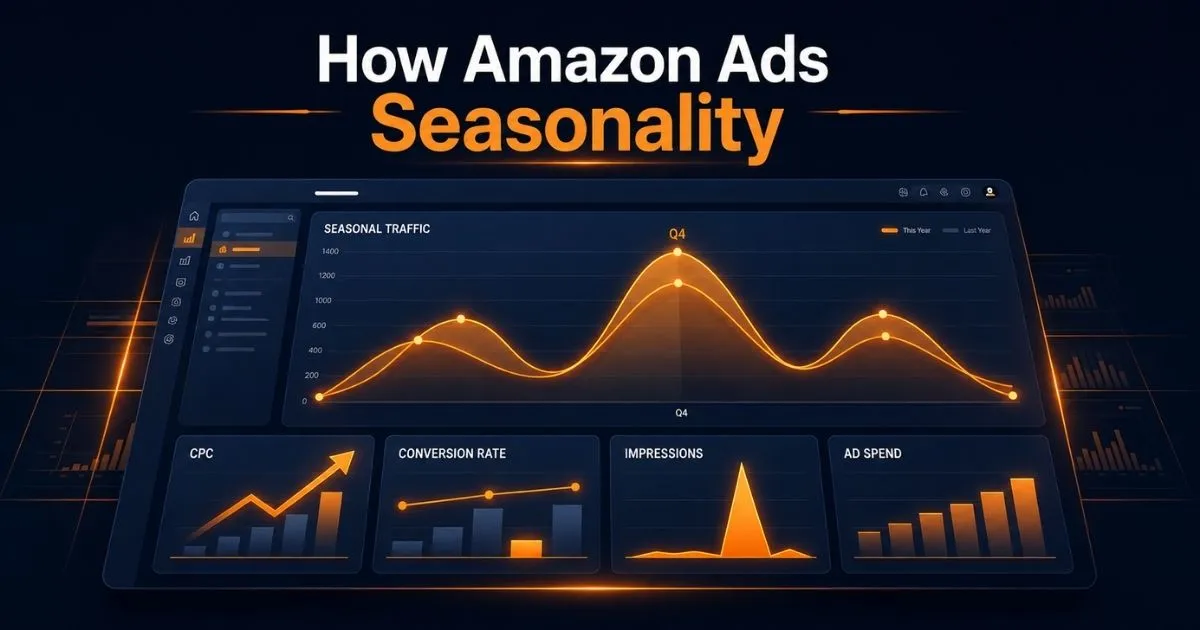
How Amazon Ads Seasonality Changes PPC Performance
A campaign that performed profitably last month can suddenly become expensive even when you have not changed its bids, keywords, or structure. CPC may increase before a shopping event, conversion may weaken after it ends, or a seasonal product may lose impressions as customer demand moves elsewhere.
That does not automatically mean the campaign structure is broken.
Amazon ads seasonality refers to recurring changes in search demand, competition, CPC, conversion rate, and purchase intent during holidays, promotional events, weather cycles, and product-specific buying periods. If performance remains weak beyond the expected seasonal window, the cause may no longer be seasonal. Move to a broader review of campaign structure, listing conversion, targeting, and unit economics.
Before reducing bids or rebuilding campaigns, compare changes in CPC, click-through rate, conversion rate, branded and non-branded traffic, total sales, contribution margin, and inventory. Seasonality should be diagnosed from connected evidence, not used as a general explanation for every performance decline.
This guide shows you how to identify seasonal changes, prepare campaigns before demand rises, manage spend during peak periods, and reset bids and budgets after the buying window closes.
ScaleA2Z uses AI-assisted analysis, third-party reporting tools, and human-led PPC management to connect seasonal campaign performance with profitability, listing conversion, and inventory risk.
Table of Contents
What Is Amazon Ads Seasonality?
Amazon Ads seasonality refers to the recurring changes in advertising performance driven by shifts in customer demand, purchase intent, competition, and product relevance during specific periods. It can affect impressions, CPC, click-through rate, conversion rate, ACoS, TACoS, budget usage, and inventory velocity.
Seasonality can be broad, such as Q4 gifting demand, or highly product-specific. Patio products may respond to warmer weather, school supplies may peak before academic terms, and gifting products may experience short demand windows around individual occasions.
The effect also differs by account. One ASIN may gain profitable non-branded traffic while another experiences higher CPC without enough conversion improvement to justify the additional spend.
For that reason, seasonality should not trigger automatic account-wide changes. Use it to decide which temporary bids, budgets, targets, and campaign settings should be increased, protected, reduced, or returned to their normal baseline.
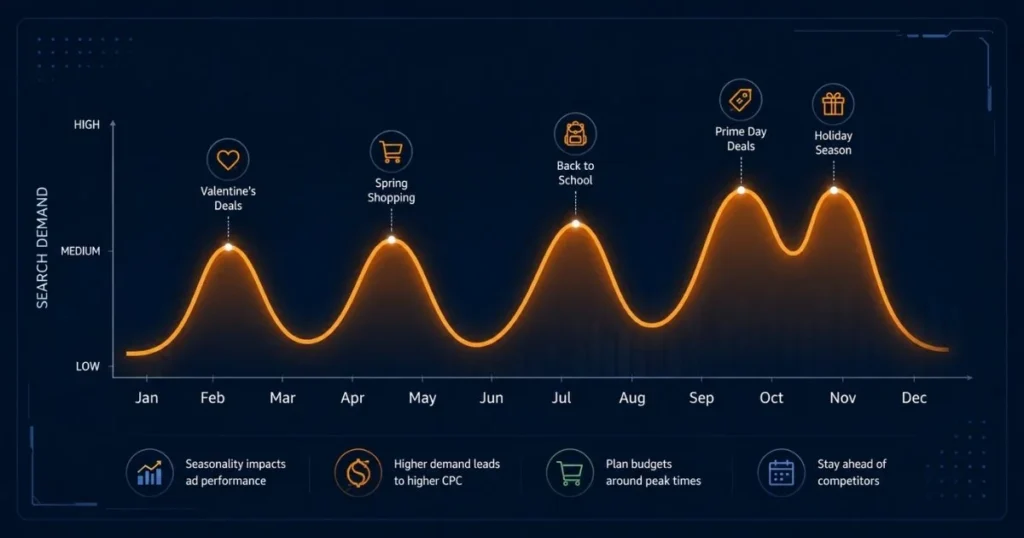
Which Seasonal Periods Affect Amazon PPC?
Not every Amazon product follows the same seasonal calendar. Start with marketplace events and major shopping periods, then map them against the buying cycle of your specific category, product, and customer.
Q4 Holiday Demand
October through December can create stronger shopping intent in many gifting and consumer categories. It may also bring greater advertising competition, faster budget usage, promotional pressure, and higher inventory risk.
During Q4, advertising competition can increase as more brands target gift-related and high-intent searches. The effect is not equal across every category, so compare current CPC, conversion rate, and search-term performance with your own historical baseline rather than relying on a universal percentage.
Campaigns may consume their daily budgets earlier as traffic and competition increase. Before raising bids or budgets, confirm that the additional traffic remains relevant, conversion can support the higher cost, and inventory is sufficient.
Preparation should begin early enough to review the equivalent historical period, update seasonal profitability limits, confirm inventory runway, and identify which campaigns may require temporary Q4 budget changes. The correct timeline depends on your product category, production lead time, campaign volume, and marketplace.
Prime Day and Other Amazon Promotional Events
Confirm the official event dates, deal eligibility, promotional requirements, and marketplace-specific conditions before finalizing budgets or campaign schedules.
Amazon promotional events can concentrate demand into a relatively short period. This may increase impressions, clicks, CPC, conversion, and daily budget consumption, but the outcome depends heavily on the strength of your offer.
Confirm the official event dates, deal eligibility, promotional requirements, and marketplace-specific conditions before finalizing budgets or campaign schedules. Then determine whether the ASIN has sufficient inventory, competitive pricing, Prime eligibility where required, a relevant promotion, and enough contribution margin to support higher advertising costs.
Use the weeks before the event to confirm the relevance of seasonal search terms and identify which existing campaigns may need temporary bid or budget adjustments. Match type also affects how widely seasonal keywords can trigger ads, so review our exact, phrase, and broad match comparison before expanding seasonal targeting. The event itself is not the ideal time to discover that your seasonal keyword list attracts irrelevant traffic.
Category-Specific and Product-Specific Peaks
Valentine’s Day, Mother’s Day, back-to-school periods, weather changes, travel seasons, sporting events, and local cultural occasions may affect particular products more than broad retail events.
Build a category calendar using your own monthly sales, advertising, query, and inventory history. Mark the weeks when impressions begin changing, not only the date of the final event.
A secondary period is worth targeting only when the product, search intent, offer, and margin support it. Avoid adding seasonal keywords merely because an event appears on the calendar.
How Seasonality Changes Amazon PPC Metrics
Seasonality can influence several connected PPC metrics, but they may not move at the same time or in the same direction. Understanding which signal changed first helps you separate shifts in demand, auction competition, traffic quality, conversion, and profitability.
| Signal | What a Seasonal Change May Look Like | What You Must Confirm |
|---|---|---|
| Impressions | Demand starts rising or falling | Search terms remain relevant |
| CPC | Auction competition changes | Conversion can absorb the new click cost |
| CTR | Shopper interest in the offer changes | Main image, price and promotion remain competitive |
| Conversion rate | Purchase intent strengthens or weakens | Traffic mix and listing conditions are comparable |
| ACoS | Ad cost changes relative to attributed sales | Current break-even ACoS and reporting window |
| TACoS | Advertising spend changes relative to total sales | Organic and total-sales direction |
| Budget usage | Campaigns exhaust budgets earlier | Additional spend remains profitable |
| Inventory velocity | Units sell faster than planned | Replenishment can support the increase |
A seasonal change rarely affects only one metric. Diagnose the pattern across traffic cost, conversion, total sales, profit, and inventory before making a campaign-wide adjustment.
Impressions and Search Demand
Seasonal demand often appears first through changes in impressions and search-query activity. However, more impressions do not automatically mean more qualified demand.
Compare current search terms with the equivalent period from the previous year where data is available. Look for changes in branded, non-branded, gifting, and event-related queries that may indicate a shift in seasonal demand.
An increase is useful only when the traffic remains relevant, and the listing can convert it profitably.
CPC and Auction Competition
CPC can increase when more advertisers compete for the same placement, but the size and timing of the increase vary by keyword and category.
Do not cut bids only because CPC has risen. Check whether the expected seasonal conversion rate and current contribution margin can support the temporary increase in cost per click.
For example, a higher CPC may still be acceptable when conversion improves enough to keep cost per order within target. The same increase may be unprofitable when the listing’s conversion rate remains flat.
Conversion Rate and Purchase Intent
Purchase intent may strengthen near an event, but conversion can also decline when broad seasonal traffic reaches a product that is not competitively priced, gift-ready, well reviewed, or relevant to the query.
Separate traffic changes from listing changes. Check whether price, coupon, delivery promise, Featured Offer status, reviews, variations, and inventory changed during the same period.
This prevents you from blaming seasonality for a conversion problem caused by the offer itself.
How Seasonal Demand Changes ACoS and TACoS
ACoS may rise during a seasonal period when CPC increases faster than conversion. TACoS may move differently if the event also changes total or organic sales. If TACoS remains elevated after seasonal demand returns to normal, use our guide to reducing TACoS above 30%.
Compare these metrics with the same seasonal stage rather than an unrelated normal period. For example, pre-event prospecting, peak-event sales, and post-event decline should not be interpreted as one continuous performance window.
Use your current break-even ACoS as a guardrail, but keep the detailed profitability calculation in your broader PPC profitability process. The seasonal question is whether temporary changes in demand and competition justify a temporary change in spend.
For a complete margin and break-even review, see our guide to scaling Amazon ads without killing profit.
How to Build a Reliable Seasonal Baseline
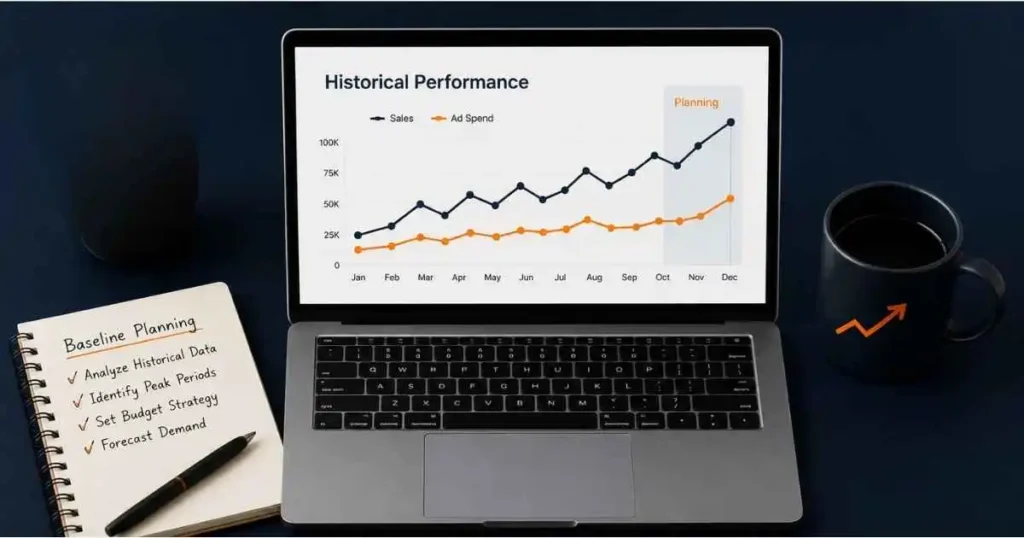
A seasonal forecast should begin with comparable historical evidence. Looking only at last week’s ACoS or the event date can hide the point when demand, CPC, or conversion actually started changing.
| Compare | Why It Matters |
|---|---|
| Same period last year | Shows recurring account-specific patterns |
| Previous four to eight weeks | Establishes the immediate pre-season baseline |
| Promotional versus normal days | Separates event effects from normal performance |
| Branded versus non-branded traffic | Shows whether growth reached new demand |
| CPC versus conversion | Explains whether higher cost was offset by buyer intent |
| Ad sales versus total sales | Helps evaluate incremental growth |
| Margin before and during promotion | Prevents outdated ACoS targets |
| Sales velocity versus days of cover | Identifies stockout risk |
Start With Your Own Historical Data
Your own account history is usually the most relevant starting point because it reflects your ASINs, prices, reviews, marketplace, traffic, inventory, and campaign structure.
Review the equivalent seasonal period and identify:
- When impressions began increasing
- When CPC started changing
- Which search terms gained or lost seasonal relevance
- Whether branded or non-branded demand grew
- Which campaigns exhausted their budgets
- How conversion changed
- Whether the seasonal period improved total contribution profit
- When performance returned to its normal range
Historical data is not a guarantee. Pricing, competition, reviews, inventory, and category demand may be different this year. Use previous performance as a baseline, not a fixed forecast.
This review should identify seasonal patterns, not replace a full search-term optimization process. A separate search-term optimization process should be used when you need to harvest converting queries, add negatives, or reorganize targets.
Use Brand Analytics Where Available
Eligible brand owners can use Amazon Brand Analytics reports to examine customer search behaviour and changes in search-term popularity. Search Frequency Rank shows how popular a search term is relative to other terms during the selected period.
Track relevant terms across comparable weekly or monthly periods to identify whether demand appears to be increasing before a seasonal event. Then compare that movement with advertising impressions, clicks, orders, total sales, and inventory.
In this framework, Brand Analytics is used only to check whether query demand is moving in line with the expected seasonal period. Detailed query analysis should remain part of a separate Brand Analytics workflow.
Brand Analytics should be treated as one layer of evidence. A change in Search Frequency Rank does not by itself confirm that your ASIN will receive more traffic or convert profitably.
Use Google Trends as a Supporting Signal
Google Trends can help identify broad recurring interest around a product category or occasion. Use a multi-year view and compare related terms to see whether demand usually rises during a similar period.
Because it reflects Google searches rather than Amazon transactions, it cannot confirm Amazon conversion, CPC, or purchase intent. Use it to support, not replace, Amazon-specific data.
Is It Seasonality or an Amazon PPC Problem?
Do not label a performance change as seasonal until you rule out other causes. The pattern across CPC, conversion, total sales, listing conditions, and inventory usually shows where the real problem sits.
| Performance Pattern | More Likely Cause | First Action |
|---|---|---|
| CPC rises while conversion stays stable | Higher auction competition | Recalculate profitable bid limits |
| Impressions rise but CTR falls | Broader or less relevant traffic | Review search terms, image and price |
| CPC stays stable but ACoS rises | Conversion or order-value decline | Check listing and offer changes |
| Ad sales rise but total sales stay flat | Paid traffic may be replacing other sales | Compare branded share and TACoS |
| Only one ASIN declines | Product-specific issue | Check price, reviews, inventory and Featured Offer |
| Multiple related ASINs decline together | Demand or category movement | Compare query and category trends |
| Sales rise but stock cover falls sharply | Inventory constraint | Control demand and protect availability |
| Results fall immediately after an event | Post-event demand normalization | Reduce temporary bids and budgets |
| Performance remains weak beyond the expected season | Structural PPC or listing issue | Run a full campaign and listing audit |
Use the Amazon PPC not profitable guide when the decline continues after seasonal demand, promotions, and reporting delays have normalized.
Quick Tip: A genuine seasonal explanation should be supported by a relevant timing pattern and more than one metric. “It is probably seasonality” is not a diagnosis.
How to Adjust Amazon PPC Across a Seasonal Peak
Seasonal campaign management works best as a four-stage process. Each stage has a different objective, measurement window, and level of risk.
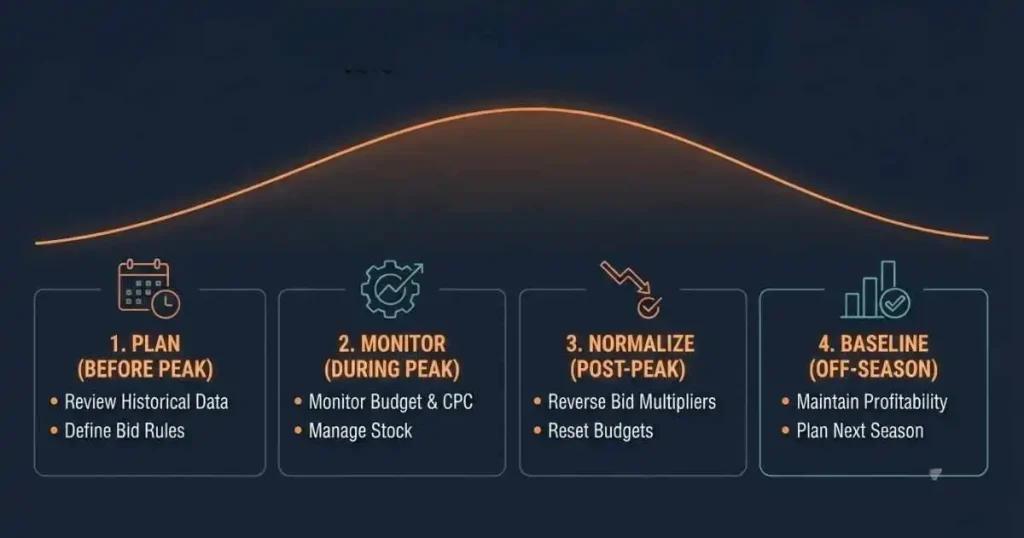
Before the Seasonal Peak
Begin early enough to establish the normal baseline and prepare only the temporary changes required for the expected seasonal window. The correct lead time depends on inventory, campaign volume, category demand, and the event.
- Compare the same stage of the previous seasonal period.
- Identify search terms with recurring seasonal relevance.
- Update the break-even ACoS for current promotions.
- Identify campaigns likely to exhaust their budgets during the peak.
- Confirm inventory days of cover and replenishment lead time.
- Check that price, creative, delivery promise, and Featured Offer status support the event.
- Define temporary bid, budget, and placement changes.
- Record the date each temporary change should be reviewed or reversed.
Do not increase every campaign in advance. Prioritize ASINs with relevant seasonal demand, stable conversion, sufficient margin, and enough inventory.
Quick Tip: Create a separate record of seasonal bid and budget changes. Without a rollback list, temporary peak-season settings often remain active after demand has declined.
During the Peak
During the peak, monitor the account frequently enough to catch budget exhaustion, irrelevant traffic, conversion changes, and stock risk.
Focus on:
- Campaigns running out of budget early
- CPC changes by important search term
- Conversion by placement
- Branded versus non-branded order mix
- Search terms spending without orders
- Contribution profit after coupons
- Inventory velocity and days of cover
- Changes in total sales and TACoS
Extend temporary peak-period spend only where the campaign is capturing relevant seasonal demand and the ASIN can support the resulting sales velocity. Do not apply the same increase to every target simply because overall traffic is rising.
When the issue is specific to top-of-search, rest-of-search, or product-page performance, use our placement optimization strategy for a deeper placement-level diagnosis.
Immediately After the Peak
Post-season performance often weakens before campaign managers reset bids and budgets. Review temporary changes as soon as the buying window closes.
Reduce or reverse:
- Temporary placement multipliers
- Elevated keyword bids
- Event-specific budgets
- Seasonal broad-match expansion
- Time-sensitive promotional targeting
- Keywords that no longer show relevant purchase intent
Do not reduce everything at once. Retain search terms that continue producing profitable demand and remove the targets whose relevance ended with the event.
During the Off-Season
The off-season is the period for returning temporary seasonal settings to a sustainable baseline.
Review:
- Event-specific bids and budgets
- Temporary placement increases
- Seasonal keywords that have lost relevance
- Campaigns retained only for the peak
- Current demand compared with the normal baseline
- Inventory plans for the next seasonal cycle
- Lessons recorded from the completed event
Keep campaigns active where they continue producing profitable and relevant demand. Use the off-season to reset seasonal settings first. Broader search-term cleanup, match-type restructuring, and listing optimization should be handled separately through their relevant PPC and listing processes.
When a Higher Seasonal CPC Is Still Profitable
Suppose a kitchen-storage ASIN normally has:
- Average CPC: $1.00
- Conversion rate: 10%
- Advertising cost per order: $10
- Contribution profit before advertising: $14
Before a gifting period, average CPC rises to $1.20, but conversion improves to 15%.
The estimated advertising cost per order becomes:
$1.20 ÷ 0.15 = $8
The CPC is higher, but the estimated advertising cost per order is lower because a greater share of clicks convert. Whether the product is more profitable still depends on selling price, promotions, fees, returns, and contribution margin.
Now consider a second scenario where CPC rises to $1.20, but conversion remains at 10%:
$1.20 ÷ 0.10 = $12
The estimated $12 advertising cost per order remains below the $14 contribution profit before advertising, leaving approximately $2 before any additional costs or reporting differences are considered.
The seasonal decision is whether the temporary conversion improvement offsets the higher CPC while keeping advertising cost per order within the ASIN’s current margin and inventory limits.
How to Adjust Your PPC Budget for a Seasonal Window
A seasonal budget adjustment should estimate how much additional qualified demand the ASIN can support during a defined event window. It should not become a permanent account-wide budget increase.
Use this sequence:
- Establish the normal daily budget baseline.
- Identify campaigns affected by the seasonal event.
- Estimate the temporary increase in qualified traffic.
- Confirm the maximum seasonal cost per order.
- Check inventory capacity across the event window.
- Assign additional budget only to validated seasonal campaigns.
- Reserve part of the budget for the highest-priority days.
- Set a fixed date for returning budgets to baseline.
Increase a seasonal campaign’s budget only when it is exhausting its current allocation while producing relevant orders within the break-even ACoS or maximum advertising cost per order defined for that event.
Seasonal PPC Change Checklist
Before applying temporary seasonal bid, budget, keyword, or placement changes, confirm that:
- The ASIN has a genuine seasonal demand pattern.
- Historical periods are comparable.
- The current break-even ACoS reflects pricing, fees, and promotions.
- Seasonal keywords are relevant to the product.
- Branded and non-branded traffic are separated.
- Listing conversion is stable.
- The Featured Offer and delivery promise are secure.
- Inventory can support the expected sales velocity.
- Temporary bid and budget changes have a rollback date.
- Success will be measured through profit and total sales, not only ad-attributed revenue.
Final Takeaway
Amazon ads seasonality can affect impressions, CPC, conversion rate, budget utilization, and inventory velocity, but it does not affect every product or campaign in the same way.
Before making a major PPC adjustment, confirm that the change follows a genuine seasonal pattern rather than a persistent campaign, listing, or inventory problem.
Prepare before the peak, monitor connected business metrics during it, and reverse temporary settings when the buying window closes. The goal is to respond to a temporary demand change without mistaking it for a permanent account trend or leaving peak-season settings active after the opportunity ends.
ScaleA2Z’s Amazon Account Management Services help brands prepare for seasonal demand through PPC optimization, listing improvements, inventory coordination, and ongoing account management.
Frequently Asked Questions
What is Amazon ads seasonality?
Amazon ads seasonality is the recurring change in impressions, CPC, conversion, purchase intent, and advertising performance during specific shopping periods, weather cycles, promotional events, or product buying seasons. The effect depends on the product, category, marketplace, offer, and competition.
How does seasonality affect Amazon PPC?
Seasonality can change search demand, auction competition, click costs, conversion rate, budget usage, ACoS, TACoS, and inventory velocity. Review these metrics together because a higher CPC may remain profitable when conversion also improves.
How early should you prepare Amazon ads for a seasonal peak?
Many sellers begin reviewing data several weeks before an expected peak, but the correct timing depends on inventory lead time, campaign volume, category behaviour, and the event. Preparation should begin early enough to test targeting and resolve listing or stock issues before demand rises.
How can you tell whether a PPC decline is seasonal?
Compare the change with the same historical period, current query demand, CPC, conversion, total sales, branded traffic, listing conditions, and inventory. A seasonal explanation should match a relevant timing pattern and affect more than one supporting metric.
Should you increase Amazon PPC budgets during peak season?
Apply a temporary budget increase only when the campaign is limited by budget, the additional traffic is seasonally relevant, performance remains within the event-specific target, and inventory can support the additional sales. Do not raise every campaign merely because a major shopping event is approaching.
What should you do with seasonal campaigns after the event?
Review temporary bids, placement multipliers, budgets, and event-specific keywords immediately after the demand window. Reduce or remove targets that have lost relevance, while retaining terms that continue producing profitable orders.