Cannibalization in Amazon Ads — The Hidden Profit Killer
Your ACoS looks fine. Ad sales are up. But your total revenue has barely moved in three months.
This is exactly what cannibalization in Amazon ads looks like from the inside. It hides behind clean-looking metrics, inflates your ad-attributed sales, and quietly drains the profit you thought you were building. Your organic sales drop by roughly the same amount as your ad sales rise, and most sellers never connect the dots.
If your ad spend keeps climbing but overall revenue stays flat, cannibalization is likely the reason. This guide covers exactly what it is, why your standard metrics hide it, how to find it in your account, and how to fix it without pulling back on campaigns that are genuinely working.
Table of Contents
What Is Cannibalization in Amazon Ads
Cannibalization in Amazon ads happens when your paid campaigns take credit for sales your product would have earned organically or when your own campaigns compete against each other for the same search terms. Either way, ad spend rises without growing actual revenue.
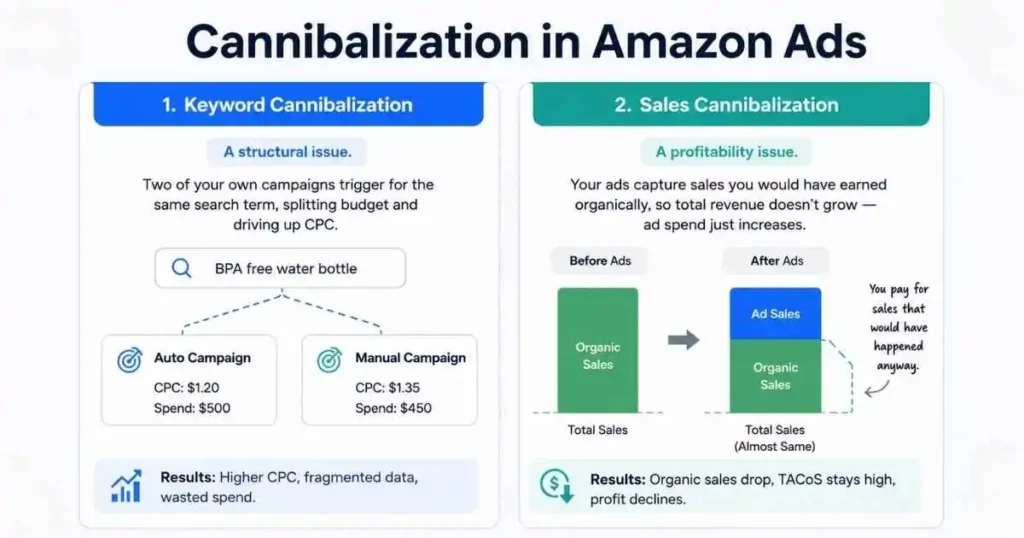
The simple definition
If your product ranks in the top three organic results for a keyword, and a customer was about to click your organic listing but clicks your Sponsored Products ad instead, you just paid for a sale that was already yours. No new customer. No new revenue. Just an added cost on an existing conversion.
That is the core of it. You are not growing sales. You are adding cost to sales that were already happening.
Keyword cannibalization vs sales cannibalization
These are two separate problems that often get confused. Keyword cannibalization is a structural issue. Two of your own campaigns, for example, an auto and a manual, both trigger for the same search term. Budget splits, data fragments, and CPC rises because you are effectively bidding against yourself.
Sales cannibalization is a profitability issue. Your PPC ads intercept customers who would have found and bought from your organic listing anyway. Ad sales go up, organic revenue drops by a similar amount, total sales barely move, and your ad spend has increased. You paid to reslice the same pie.
Both are common. Both cost you money. And both are fixable once you know where to look.
For a deeper understanding of how Amazon’s campaign types interact, our guide on Amazon PPC campaign structure covers the foundations in detail.
Why It Quietly Kills Your Profit
The damage from cannibalization does not show up as one obvious red number. It builds slowly and spend creeps up, TACoS stuck, total profit flat. Here is how it plays out across your account.
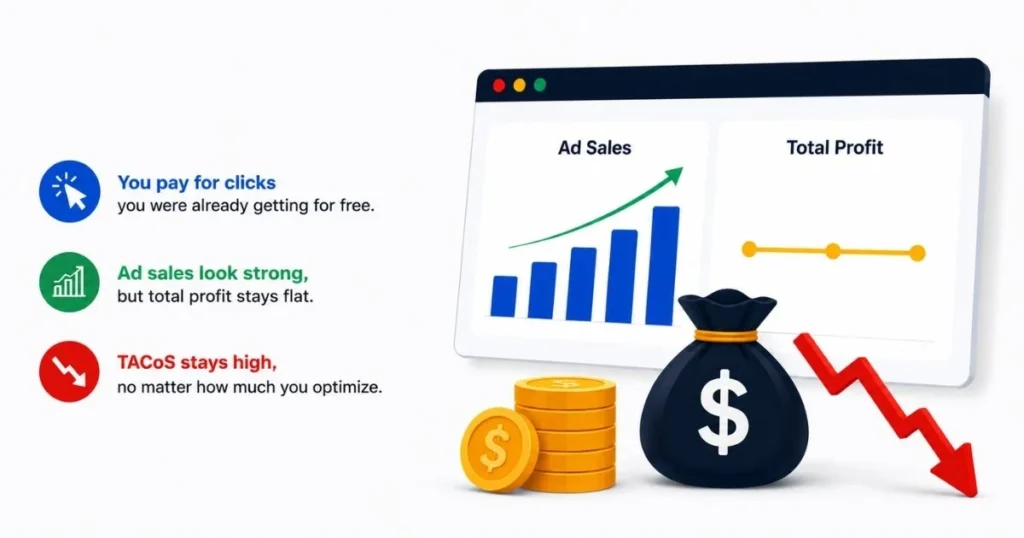
You pay for clicks you already own
Let’s say you sell a stainless steel water bottle and you rank on page one organically for “BPA-free water bottle.” A customer searches for that phrase, sees your Sponsored Products ad at the top, clicks it, and buys. Amazon attributes the sale to your PPC campaign.
But that customer was already going to find your organic listing two positions below. You just paid three dollars for a sale that was already yours. Multiply this across hundreds of keywords and thousands of clicks monthly, and you have a significant Amazon PPC wasted ad spend problem, money that replaced free traffic with paid traffic without adding a single new customer.
Ad sales rise but total profit stays flat
Your campaign reports show strong numbers. Ad-attributed sales are up. ROAS looks healthy. But pull your total revenue separately — if organic revenue dropped by roughly the same amount as sales rose, you did not grow anything. This is the pattern that makes Amazon ads profit loss invisible in standard reporting. The dashboard looks fine. The business is not moving.
Organic growth stalls without you noticing
Amazon’s algorithm rewards consistent organic clicks and conversions. When PPC consistently intercepts your organic traffic, your organic listing stops accumulating the signals it needs to strengthen its rank. Over time, you become dependent on ads to maintain visibility, and your organic revenue stagnates even as you keep increasing ad spend to compensate.
This is how Amazon PPC eating organic sales becomes a long-term trap, not just a short-term cost problem.
ACoS vs TACoS — Which One Tells the Truth
If you are only watching ACoS, you will never catch cannibalization. ACoS is built to measure paid efficiency in isolation. It has no way of knowing whether a sale would have happened organically anyway.
Why ACoS misleads you
ACoS = Ad Spend ÷ Ad-Attributed Sales × 100
If you spend $500 and ads attribute $2,500 in sales, ACoS is 20%. That looks clean. But ACoS cannot see that $1,000 of those sales came from customers who would have converted through your organic listing if the ad had not been there. It just sees the click and the conversion.
ACoS is the right metric for comparing keywords, match types, and campaign efficiency against each other. It is the wrong metric for diagnosing whether your advertising is growing your business or just rerouting existing demand through a paid channel.
Why TACoS shows the real picture
TACoS = Ad Spend ÷ Total Revenue (Paid + Organic) × 100
This is the metric that exposes cannibalization. If your ads bring genuinely new customers, total revenue grows alongside ad spend, and TACoS stays flat or drops. If your ads cannibalize organic sales, total revenue barely moves, ad spend rises, and TACoS climbs — even while ACoS looks fine.
For Amazon TACoS optimization, the rule is simple: if ACoS holds steady but TACoS keeps rising over three to four consecutive weeks, run a cannibalization audit before you touch any bids.
| Metric | What It Measures | Shows Cannibalization? |
|---|---|---|
| ACoS | Ad spend vs ad-attributed sales only | No |
| TACoS | Ad spend vs total revenue | Yes |
| ROAS | Revenue per ad dollar spent | Partially |
Amazon’s own Brand Analytics documentation recommends using total sales metrics alongside advertising metrics when evaluating campaign health — because ad-attributed sales alone do not capture the full impact on your account. You can access TACoS tracking directly inside your Amazon Advertising Console.
What Causes Cannibalization in Amazon Ads
Cannibalization rarely starts with one big mistake. It builds as you add campaigns, products, and keywords without a system to keep ownership clear.
Overlapping match types
Broad match and exact match campaigns running on the same product will eventually compete for the same search terms. Broad match casts a wide net and sometimes captures a term your exact match campaign was specifically built to own. The result is split data and inflated CPC on terms where you should have clean, controlled performance.
This is a match type overlap problem — for a full breakdown of how to structure match types correctly, read our guide on exact vs phrase vs broad match on Amazon. The cannibalization point is simple: every keyword needs one campaign that owns it, and match types without negative keyword bridges create overlap.
No negative keyword bridge between auto and manual
You launch an auto campaign to discover search terms, then build a manual campaign to act on the best ones. But you forgot to add negative keywords in the auto campaign for terms your manual campaign now targets. Both campaigns compete for the same searches. Your auto campaign wins an impression that your exact match manual campaign was built to convert efficiently. You get a worse result and pay more for it.
Quick Tip: Every time you move a winning search term from auto to manual, immediately add it as a negative exact match in the auto campaign. This single habit eliminates the most common form of keyword cannibalization.
Product variants bidding on identical keywords
Say you sell a protein shaker in three sizes — 500ml, 750ml, and 1000ml — each with its own Sponsored Products campaign, all bidding on “gym shaker bottle.” Three ASINs split the budget, split the ASIN performance data, and none gets enough conversion history to optimize reliably. Decide which variant owns each keyword and consolidate bidding there.
This type of Sponsored Products cannibalization is one of the easiest to fix — and one of the most overlooked.
Branded keywords you already dominate organically
Amazon branded keyword cannibalization is one of the most expensive and least noticed forms of wasted spend. If your brand name search already returns your product in positions one and two organically, running aggressive Sponsored Brands or Sponsored Products ads on your own brand name mostly captures customers who were already going to buy from you.
Your ROAS on branded campaigns will look impressive, often 8x to 15x or higher. That high ROAS is not a sign of campaign strength. It is a sign you are paying for demand that was already yours. A defensive low-bid branded campaign makes sense to protect against competitor product targeting. A high-budget, aggressive, branded campaign is usually expensive cannibalization dressed up as strong performance data.
How to Detect It in Your Account
Finding cannibalization requires three specific checks. Do all three before adjusting any bids.
Pull your Search Term Report
Download your Search Term Report from the Amazon Advertising Console for the last 30 to 60 days. Open it in a spreadsheet, filter by search term, and sort alphabetically. You are looking for the same search term appearing in two or more of your own campaigns, both showing spend and clicks. That is campaign-level cannibalization confirmed.
If you have a brand registry, the Search Query Performance report inside Brand Analytics gives you a cleaner view. It shows your share of voice broken down by organic vs paid clicks per search term, making the paid vs organic sales split immediately visible.
Compare PPC spend against organic rank
List your top 20 to 30 keywords and check your organic rank for each. Any keyword where you rank in positions one to five organically and spend heavily on PPC is a strong cannibalization candidate.
A reliable test: reduce top-of-search bids by 50% on suspected keywords for two to three weeks. If total sales drop less than 10%, those ads were highly cannibalistic. If sales drop more than 30%, the traffic was genuinely incremental, and the bids should be restored.
Three warning signs in your metrics
These three signals together almost always point to active cannibalization. One alone could have another explanation, but all three together are a clear diagnosis.
- One: ACoS is flat or improving, but TACoS keeps rising.
- Two: CPC is climbing on search terms where you already hold a strong organic rank.
- Three: ad-attributed sales are growing while organic revenue drops by a similar amount in the same period.
How to Fix It
Once you know where cannibalization is happening, the fix is straightforward — but it requires consistency. Work through these in order.
Build a negative keyword bridge
Go through every search term in your auto campaigns that your manual campaigns already target. Add each one as a negative exact match in the auto campaign. This forces clean traffic flow, auto discovers, manual converts, and eliminates the most damaging form of campaign overlap immediately.
This is the foundation of proper campaign structure on Amazon. If you want to see how this fits into a complete account architecture, our Amazon PPC management service page walks through how we build this from the ground up.
Consolidate duplicate keywords
For every keyword appearing in more than one campaign, pick one campaign to own it — the one with better CVR and conversion history. Then add the keyword as a negative in every other campaign where it appears.
Do not just lower bids elsewhere. A lower bid still splits your data. A negative keyword creates a clean boundary and gives your chosen campaign clean, uncontaminated data to optimize from.
Reduce bids on your top organic terms
For keywords where you rank positions one to three organically, drop bids to 30 to 50% of their current level and monitor for two weeks. Watch total sales, not ad sales. If total sales hold steady and TACoS drops, you confirmed cannibalization and started fixing it. If TACoS worsens, the traffic was genuinely incremental — restore bids.
This is Amazon TACoS optimization in practice: managing the relationship between paid and organic together, not just chasing a lower ACoS target in isolation.
Quick Tip: Do not cut bids across the board. Reduce bids only on specific search terms where your organic rank is already in positions one to five. Keep full bids on terms where you need paid traffic to compete.
Separate branded from non-branded campaigns
Create a dedicated branded campaign with a modest defensive budget and conservative bids. Keep all non-branded keywords in separate campaigns. Branded and non-branded have completely different economics — mixing them hides the real performance of your non-branded spend and inflates your overall ROAS with demand that was never at risk of being lost.
When Ads Still Make Sense
Not every overlap between PPC and organic rank is cannibalization. There are three situations where paid traffic earns its cost even when you rank organically.
New product launches
When a product has no ranking history, every sale needs to come from paid traffic. This is not cannibalization — this is PPC doing exactly what it is supposed to do, building the sales velocity and conversion data Amazon needs to start ranking the product organically. Amazon PPC incremental sales are real and measurable at launch stage. High ACoS here is acceptable because you are buying future organic rank, not replacing it.
Keywords where you are actively building rank
If you rank on page two or three for a keyword you are pushing to page one, paid traffic on that term does real work. Each Sponsored Products conversion sends a relevance signal that supports your organic rank trajectory. Once you reach positions one to three, revisit the bid — that is when the same spend starts crossing into cannibalization territory.
Competitor-heavy searches
On searches where a direct competitor would immediately take Top of Search placement if you pulled your ads, a maintained paid presence protects your share of voice. This is strategic spend, not cannibalization. The test: if you paused ads on this term, would a competitor occupy that placement within a few days? If yes, keep the campaign active at a considered bid level.
How to Prevent It Going Forward
Fixing cannibalization once is straightforward. Keeping it from rebuilding as you scale takes two habits built into your regular workflow.
Build a keyword ownership map before every new campaign
Before launching any new campaign, list every keyword it will target and cross-check against your existing active campaigns. One column for the keyword, one for which campaign currently owns it. If a keyword already belongs to an active campaign, either let that campaign keep it — and exclude it from the new one — or migrate it with a proper negative added in the old campaign.
Never let a keyword run in two campaigns simultaneously without a deliberate decision. That ambiguity is exactly how organic sales cannibalization at Amazon builds up over time — not through one big mistake but through hundreds of small unresolved ones.
Review your Search Term Report every week
A quarterly PPC audit will always be chasing problems that have been compounding for months. The search term report takes fifteen minutes weekly when you know what to look for: same search term in two or more campaigns, branded terms inside non-branded campaigns, high spend on keywords where organic rank is already positions one to three.
These three checks, done consistently, prevent the majority of cannibalization from taking hold.
At ScaleA2Z, this kind of structural review is built into how we manage every account — not as a one-time fix but as a standard weekly process. If your current setup does not include regular cannibalization monitoring, that gap compounds quickly. See how we approach it at ScaleA2Z.
Is Your PPC Setup the Problem
Sometimes the issue is not a specific keyword — it is the account structure itself. If the foundation is wrong, individual fixes will not hold for long.
Signs your structure has a problem
Check how many of these apply to your account right now.
Auto and manual campaigns for the same product share search terms with no negatives separating them. Branded and non-branded keywords sit inside the same campaigns. Multiple product variants target identical keywords across separate campaigns. Your TACoS has been flat or rising for more than four weeks despite active bid adjustments. You have never run a full search term report review across all campaigns simultaneously.
Two or more of these together mean a structural rebuild will deliver more lasting results than individual keyword fixes.
What a clean, properly managed setup looks like
Each product has one auto campaign for discovery and one manual campaign for conversion, connected by a negative keyword bridge. Branded campaigns are separated from non-branded ones. Variant ASINs have clear keyword ownership, so no two campaigns compete for the same term. The search term report is reviewed weekly, negatives are added consistently, and every campaign name makes it immediately clear what it owns.
When this structure is in place, cannibalization in Amazon ads becomes a manageable, minor issue — not the silent profit drain it is in most unstructured accounts.
If your account does not look like this today, the improvements in TACoS, organic rank, and total profitability typically show up within four to six weeks of a proper cleanup. You can book a free account audit with our team at ScaleA2Z to see exactly where the gaps are in your current setup.
Frequently Asked Questions
What is cannibalization in Amazon ads?
Cannibalization in Amazon ads happens when your paid campaigns take credit for sales your product would have earned organically — or when your own campaigns compete against each other for the same search terms. Ad spend rises without growing total revenue.
How do I find cannibalization in my Amazon PPC account?
Download your Search Term Report and look for the same search term appearing across two or more of your campaigns. Then compare your PPC spend on top keywords against your organic rank for those same terms. High spend plus strong organic rank on the same keyword is a clear cannibalization signal.
Does Amazon prevent your own campaigns from competing?
Amazon generally shows only one of your ads per search query. But this does not prevent budget fragmentation, data corruption, or paid traffic replacing organic traffic — all of which still cause the profitability damage of cannibalization even when direct auction overlap is limited.
Should I stop PPC on keywords I already rank for organically?
Reduce bids rather than pausing entirely. A defensive low-bid presence protects your placement from competitors. Use TACoS as your guide: if TACoS improves when you reduce bids, you were cannibalizing. If TACoS worsens, the traffic was genuinely incremental.
What is the difference between keyword and sales cannibalization?
Keyword cannibalization is a structural problem when two campaigns compete for the same term, splitting data and inflating CPC. Sales cannibalization is a profitability problem ads converting customers who would have bought through your organic listing anyway. Different causes, different fixes, both worth solving.
How often should I audit for cannibalization?
Review your Search Term Report weekly. Run a full cannibalization audit, organic rank vs PPC spend across all keywords, plus campaign overlap check at least once a month. Run one immediately any time you launch a new campaign or add a new product.